

Is Your Sales Team Drowning in WhatsApp Messages? Why Spreadsheets and Personal Numbers Are Costing You Sales
Picture this. It's 9 p.m., and a buyer sends an enquiry to one of your salesperson's personal WhatsApp numbers. The message sinks under family photos and good-morning forwards. He plans to copy it into Excel tomorrow. He forgets. The buyer waits, gets no reply, and calls your competitor instead. That exact story plays out in Indian businesses all the time.
Sound familiar?
If you get leads from IndiaMart, JustDial or TradeIndia, you probably know the mess. Leads land in three dashboards. Reps copy details into sheets. Nobody's sure who replied to whom. And when a rep quits, half your customer history walks out with his phone.
Why This Keeps Getting Worse

WhatsApp isn't going anywhere. WhatsApp Business users in India grew by more than 130% between 2021 and November 2025, and I'll be honest, I can't link you to that original report, so take it as reported by Appfigures. What I can say is that buyers now expect a quick reply on WhatsApp. Not tomorrow. Now.
A speed gap costs real money. In one 2025 B2B study, leads answered within five minutes closed at 32%, compared with 12% when businesses waited more than 24 hours. That's 2.6 times better. (It's not an India-only study, but the lesson travels well.)
So What's the Fix?
A WhatsApp CRM. In plain words, it's one system where all your leads and WhatsApp chats live together. Your team shares one inbox, follow-ups get automated, and you can finally see who said what. It turns messy chats into a proper sales process.
In this guide, we'll cover:
What a WhatsApp CRM really is
The features that matter for Indian small businesses
How the different options compare
How to pick the best fit for your team
Let's sort out the chaos, one step at a time.
What Exactly is a WhatsApp CRM? Understanding the Official API vs. Unofficial Tools
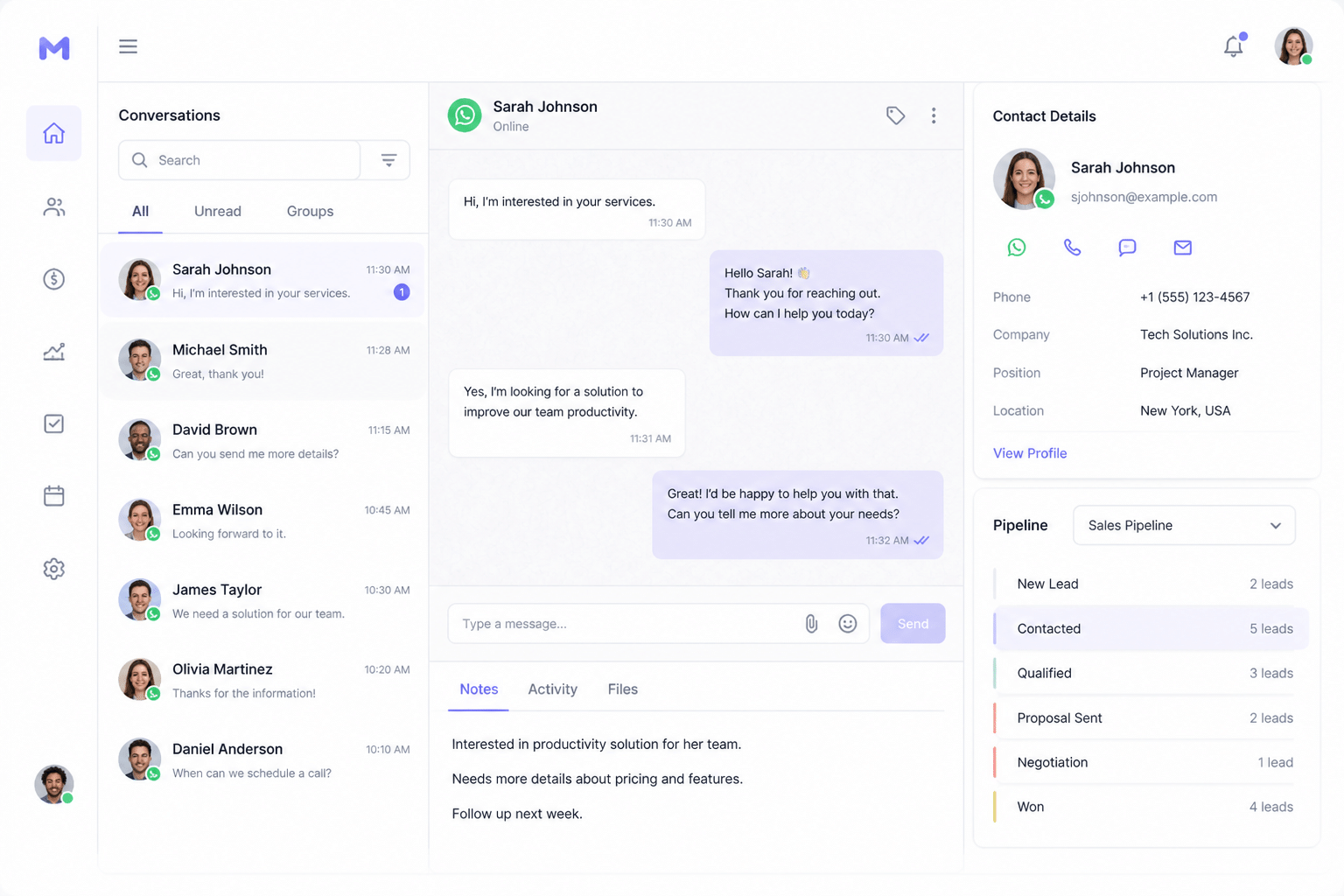
Let's start with the plain version. A WhatsApp CRM isn't just a messaging app with a fancy name. It's a system that pulls WhatsApp chats into one lead and customer pipeline, so every chat is tied to a real person, a real deal and a real owner on your team.
Think of it like this. WhatsApp is the phone call. The CRM is the notebook, the reminder alarm and the manager's dashboard, all stuck together.
What a WhatsApp CRM Actually Does
A good one handles a few jobs at once:
Captures leads from places like IndiaMart, JustDial and your website forms
Gives your whole team a shared WhatsApp inbox
Saves every message against the customer's record
Sends reminders and automated follow-ups
Shows you who replied, who didn't, and how fast
That's the difference between "we use WhatsApp" and "we run sales on WhatsApp."
And the numbers say Indian businesses are already leaning this way. A 2026 benchmark found that 67% of surveyed Indian SMBs named WhatsApp as their primary sales channel, ahead of phone calls at 54%. (Nobody has proven a national figure for all MSMEs, so treat that as one survey, not gospel.)
The Big Fork in the Road: Official API vs. Unofficial Tools
Here's where people get burned. Not every WhatsApp CRM connects to WhatsApp the same way.
The official route uses the WhatsApp Business API, approved by Meta. You usually get it through a Business Solution Provider, or BSP. The unofficial route? Tools that ask you to scan a QR code, log in with your personal number, or run a "bulk sender" on top of WhatsApp Web. Sounds easy. It's also risky.
WhatsApp's rules don't allow unofficial APIs, modified clients or scraping tools. Break them and you may see blocked messages, limited accounts or a permanent ban. Imagine losing the one number every customer already has saved. Ouch.
Here's a side-by-side look:
Factor | Official WhatsApp Business API | Unofficial tools |
|---|---|---|
Approved by Meta | Yes | No |
Number ban risk | Low, if you follow policy | High |
Security | Built for business use, with proper onboarding | Often needs personal logins or session cookies |
Broadcasting | Large lists, using approved templates | Gets flagged as spam quickly |
Team access | Many agents on one business number | Fragile, can disconnect without warning |
Green tick eligibility | Yes, you can apply | No |
Support | Provider and Meta backing | Usually none |
Scalability | Grows with your lead volume | Breaks as volume rises |
Why the Official API Is Worth It
Let's be honest, the API costs money. But what you get back matters.
Green tick verification. Buyers see a verified business, not a random number. Trust goes up fast.
Real broadcasting. You can message big audiences with approved templates, without sweating over bans.
Connected systems. Your CRM, lead sources and automation tools talk to each other.
Features that actually work. Coca-Cola ran a WhatsApp survey using Flows on the official platform and saw an 89% higher completion rate than email surveys. It's a vendor-reported result, so your mileage will vary, but it shows what the official route can do.
Cost-wise, it's more manageable than people think. One 2026 study of 13 providers found a median entry plan around ₹1,500 a month, plus Meta's small per-message charges. Some all-in-one platforms, Leadopal included, bundle official API access with the CRM itself, which saves you from stitching three tools together.
So the rule is simple. If a WhatsApp CRM needs your personal QR code, walk away. Next, let's look at the features that really matter once you've got the right foundation.
9 Must-Have Features in a WhatsApp CRM for Indian Small Businesses
Shopping for a WhatsApp CRM can feel like standing in front of a thali with 40 items. Everything looks tasty. Not everything fills you up.
So here's a plain checklist. These nine features are what an Indian small business really needs, starting with the ones that fix the biggest headaches.
Fix the Lead Chaos First

💬 1. Shared Inbox
This one's non-negotiable. A shared WhatsApp inbox matters because 46.8% of Indian MSMEs already use WhatsApp Business to talk to customers, and most of them still do it from scattered phones. A shared inbox puts every chat on one screen. You can assign a conversation to a rep, see who's replied, and jump in when someone's stuck.
And when a rep quits? The chat history stays. Nothing walks out with his phone.
✅ 2. Official API Access
We covered why this matters above, so I'll keep it short. Ask every vendor one question: "Do I connect through the official WhatsApp Business API?" If the answer involves scanning your personal QR code, move on. Leadopal, for example, offers official API access for broadcasting, plus a shared inbox that can also manage reps' existing numbers.
🔗 3. IndiaMart, TradeIndia and JustDial Integration
Here's where most global tools fall flat. Your leads live on Indian marketplaces, so your CRM has to pull them in on its own. No copy-paste. No "I'll update the sheet tonight."
A good setup creates the lead, tags the source, assigns a rep and fires off a WhatsApp reply within seconds. One manufacturing CRM guide describes exactly this flow for IndiaMart enquiries. Look for Google Ads, Facebook Ads and website form connections too, so everything lands in one pipeline.
Save Your Team's Time
⚙️ 4. Automation Builder
Automation is where a small team starts acting like a big one. You want simple drag-and-drop rules, not code. A few that work for trading and manufacturing businesses:
Send a welcome message when a new lead arrives
Route leads by product, city or rep workload
Remind the rep to follow up three days after a quotation
Stop reminders the moment an order comes in
If your team can't set these up without a developer, it's the wrong tool.
There's a hidden benefit too. Switching between apps wears people down. One report found that tool fatigue costs employees about 51 minutes a week. Automation gives some of that time back.
📢 5. Bulk Broadcasting and Segmentation
Broadcasting to everyone is lazy, and it gets you blocked. Segmentation lets you send a dealer price list only to dealers, or a new catalogue only to buyers who asked about that product. Make sure the tool stores opt-in records and handles "STOP" replies automatically. Regulators are watching: TRAI reported 731,120 notices to unregistered telemarketers in 2025.
📊 6. CRM Lead Pipeline View
Picture a board with columns: New, Contacted, Quoted, Negotiating, Won. Each lead is a card you drag along. That's it. It sounds basic, but it's how an owner finally sees where deals are stuck without calling three people.
Keep Control as You Grow
📈 7. Analytics and Reporting
You can't fix what you can't see. At minimum, you need response time, leads by source, quotation-to-order rate and pending follow-ups per rep. Bonus points if WhatsApp has its own dashboard. Marketing spend decisions get a lot easier when you know IndiaMart brings volume but Google Ads brings buyers.
📱 8. Mobile Accessibility
Your reps are on the road, at factories and in godowns. They won't sit at a desk to reply. So check that the app works smoothly on a phone, and that managers can peek at the pipeline from anywhere.
🧾 9. Integration with Invoicing
This is the one people forget. A buyer says "send me a quote" on WhatsApp, and your rep opens Word, fights the formatting and sends it two hours later. Not great. When quotations and GST invoices live inside the CRM, you can send them in the same chat in minutes. A 2025 India SME Forum and Meta study of 7,835 MSMEs found 71.8% of digitised firms already use a CRM, so the real gap is tools that connect sales to billing.
Quick Demo Scorecard
Bring this to every vendor demo:
Feature | Ask the vendor to show you |
|---|---|
Shared inbox | A chat being assigned and handed over |
Official API | Proof of Meta-approved access |
Marketplace integration | A live IndiaMart lead arriving in the pipeline |
Automation | A follow-up rule built in under 5 minutes |
Broadcasting | A segmented send with opt-out handling |
Pipeline view | Leads moving between stages |
Analytics | Response time by rep |
Mobile | A reply sent from a phone |
Invoicing | A quote sent inside WhatsApp |
Got your checklist? Good. Next, let's see how the main types of WhatsApp CRM stack up against it.
Comparing the Best WhatsApp CRM Solutions in 2026: Which Type is Right for You?
Here's the thing. Most tools on the market fall into three buckets. Once you know the buckets, the shopping gets a lot easier. Let's go through them one by one, with the good and the not-so-good.
Category 1: All-in-One Sales and Marketing Platforms
Think of this as one app doing the work of four. Lead capture, CRM, WhatsApp, email, SMS and invoicing all sit in the same place. Leadopal is a good example, built for Indian MSMEs that get leads from IndiaMart, TradeIndia and JustDial.
What's good:
One source of truth. A lead's source, chats, follow-ups and quotation live on one record.
Smooth flow from lead to invoice. The rep replies on WhatsApp, sends a quote and raises a GST invoice without switching apps.
Cost-friendly. You pay once, not for a CRM, a broadcaster and an invoicing tool separately.
What's not so good: a tiny team of two might never touch half the features. If you only need a shared inbox, an all-in-one can feel like buying a truck to carry groceries.
Want to stop losing leads?
See how Lead Opal helps you capture, track, and follow up on every lead — automatically, across WhatsApp, Email & SMS.
Category 2: Standalone WhatsApp Marketing Tools
These are WhatsApp-first products. WATI and Interakt are two popular names in India. They're strong at chatbots, broadcasts, shared inboxes and campaigns, and they're usually quick to set up.
Pricing is typically a flat platform fee, with Meta's message charges on top. One 2026 roundup reports WATI Growth at ₹2,199 a month on annual billing, while Interakt Starter is ₹3,499 a quarter. Prices change, so check the current rate card.
Now the catch. The data sits in a silo. Your IndiaMart leads, your pipeline and your invoices still live somewhere else, so someone has to connect them by hand. That's the exact juggling act you're trying to escape. These tools shine for support-heavy teams or online stores. For a trading company chasing marketplace leads? Less so.
Category 3: Global CRMs with WhatsApp Add-ons
Zoho CRM and HubSpot are the big names here. The core CRM is powerful, with deep reporting and flexible pipelines. No argument there.
But for an Indian MSME, a few things pinch:
Per-user pricing adds up. Zoho CRM ranges from ₹800 to ₹2,400 per user per month across its plans, and that's before WhatsApp charges. HubSpot gets steeper. One benchmark lists Sales Hub Professional near ₹7,497 per user per month, plus a ₹1,25,000 onboarding fee.
WhatsApp is often extra. Some global CRMs need a WhatsApp add-on or a third-party connector, which means another bill and another thing to maintain.
Local fit is shaky. IndiaMart syncing, field mapping and GST-ready invoicing may need custom work. I couldn't find solid owner reviews on this, so I won't claim a specific problem. Just test it in a trial before you commit.
If you already run Zoho for accounting and have a tech-savvy admin, it can work well. Otherwise, it's a lot of setup.
Side-by-Side: How the Three Types Compare
Here's a quick view. It's a general pattern, and individual products vary.
Feature | All-in-One Platforms | Standalone WhatsApp Tools | Global CRMs |
|---|---|---|---|
Shared WhatsApp inbox | ✅ Built in | ✅ Strong | ⚠️ Often an add-on |
Official API access | ✅ Usually bundled | ✅ Yes | ⚠️ Via connector or module |
IndiaMart, TradeIndia, JustDial leads | ✅ Direct integrations | ❌ Usually manual or via other tools | ⚠️ Needs setup or custom work |
WhatsApp chatbots | ✅ Automation builder | ✅ Deepest options | ⚠️ Basic or paid extra |
Sales pipeline view | ✅ Yes | ⚠️ Basic | ✅ Very strong |
Quotations and GST invoicing | ✅ Included | ❌ Separate software | ⚠️ Often separate or limited |
Sales targets per rep | ✅ Included | ❌ Rarely | ✅ Yes |
Pricing style | One platform plan | Flat plan plus Meta fees | Per user, plus add-ons |
Best for | Teams wanting one system | Support or campaign focus | Larger teams with IT help |
So Which One Fits You?
Quick gut check. Do your leads come mostly from marketplaces, and do your reps send quotes over WhatsApp? An all-in-one probably saves you the most headache. Mostly running campaigns to existing customers? A standalone tool may be enough. Already deep in a global CRM with a tech person on staff? Stay put, and test the IndiaMart sync first.
Not sure how to weigh it all? Next, we'll turn this into a simple step-by-step way to choose.
A Step-by-Step Guide to Choosing the Right WhatsApp CRM for Your Business
You've seen the features. You've seen the three types of tools. Now comes the hard part: picking one.
Here's the good news. You don't need a fancy process. Three steps will get you most of the way there, and the first one doesn't even involve looking at software.
Step 1: Audit How You Sell Today
Before you watch a single demo, look at your own mess. (Yes, I know. Nobody enjoys this part.)
Grab a notebook and answer these questions honestly:
Where do your leads come from? IndiaMart, JustDial, ads, walk-ins, a cousin's reference?
How do you track them right now? Excel, paper register, someone's memory?
Which phones do your reps use to chat with buyers?
What's the biggest bottleneck? Slow replies, lost follow-ups, late quotes?
Now do something simple. Pull up last week's leads and count how many got a reply within an hour. I tried this with a friend's trading firm in Surat, and the answer was embarrassing for everyone. But it told us exactly what to fix.
One more thing. Ask your reps what annoys them most. They'll often name the real problem in about 30 seconds.
Step 2: Split Must-Haves From Nice-to-Haves
Open the nine features from earlier and sort them into two piles. Your audit decides which pile each one lands in.
Here's how that might look:
If your audit shows... | Then this is a must-have |
|---|---|
80% of leads come from IndiaMart | Direct marketplace integration |
Reps chat from personal phones | Shared inbox and official API |
Quotes take hours to send | Invoicing inside the CRM |
Follow-ups keep slipping | Automation builder and reminders |
You can't tell who's performing | Analytics and sales targets |
Everything else? Nice-to-have. A feature you won't use in six months shouldn't drive your decision.
One rule I'd never bend: official WhatsApp API access. It's a dealbreaker, not a preference. Also, be wary of buying for the company you hope to be in five years. One 2025 buyer's guide warns that enterprise-grade systems can add extra admin work for small teams, so pick what fits today and can stretch later.
Step 3: Check Scalability and Support
This step gets skipped a lot. It shouldn't.
Can It Grow With You?
Ask what happens when you go from 3 reps to 15. Do prices jump per user? Are there limits on contacts, messages or automations? Can you add a new lead source, say a Facebook ad campaign, without calling a developer? Get the answers in writing.
Also work out the 12-month cost, not just the headline price. Add users, WhatsApp message charges, onboarding and GST. Comparing the full 12 to 24 month cost is how you avoid nasty surprises.
Will Someone Pick Up the Phone?
When a template gets rejected at 11 a.m. on a busy Monday, you need a human. Not a chatbot. Look for support in Indian business hours, help in your language where possible, and billing in rupees. I couldn't find a hard industry benchmark for what Indian MSMEs expect here, so test it yourself during the trial. Send a real question and time the reply.
Your Quick Evaluation Checklist
Take this to every demo and score each line from 1 to 5:
Check | Your score |
|---|---|
Uses the official WhatsApp Business API | |
Pulls in your main lead source automatically | |
Shared inbox works on mobile | |
You can build a follow-up rule in 5 minutes | |
Total 12-month cost is clear | |
Support answers within hours, not days | |
You can export your data later | |
Staff can finish a real task during the trial |
Run a short pilot with real leads before you sign anything. If a tool can't pass this list, it won't pass a busy Monday either.
So what happens once your tool is chosen and your leads finally flow into one place? That's where things get really interesting.
Beyond WhatsApp: The Power of an Integrated Sales Pipeline
Here's something I've noticed. Owners pick a WhatsApp tool, feel good for a week, then wonder why sales still feel messy. The chat is sorted. Everything around the chat isn't.
A WhatsApp CRM is a great start. But the real win comes when WhatsApp is just one stop in a longer road, from first enquiry to money in the bank.
Think System, Not Single Tool
When a lead lands in WhatsApp but the quote is made in Word, the invoice in Tally and the follow-up lives in someone's head, you've only fixed one gap. Each handoff is a place where a lead can slip.
So a lead captured via WhatsApp should keep moving. It gets a stage. It gets an owner. It gets a next step with a date. And nobody retypes anything.
There's a time cost too. Jumping between apps adds up, and one estimate says employees switch apps about 33 times a day. Fewer apps, fewer chances to drop the ball.
What the Journey Looks Like in One Platform
Let's walk through a real-life style example using an all-in-one platform like Leadopal. Say you run a packaging business and you've got a Facebook ad running.
Step | What happens | Touchpoint |
|---|---|---|
1. Lead arrives | A buyer fills your Facebook lead form. The lead is created in the pipeline with its source tagged. | CRM |
2. Instant reply | A WhatsApp message goes out within seconds, asking for quantity and city. | |
3. Assignment | The lead goes to the right rep by product or city. | CRM |
4. Conversation | The rep chats in the shared inbox. Every message is saved on the lead's record. | WhatsApp, CRM |
5. Quotation | The rep builds a quote in the same system and sends it in the chat. | CRM, WhatsApp |
6. Follow-up | Reminders fire on day 3 and day 7 if the buyer goes quiet. | WhatsApp, Email |
7. Invoice | Once the buyer says yes, the quote turns into a GST-compliant invoice with a payment QR code. | Invoice |
8. Pipeline update | The deal moves to Won and counts toward the rep's target. | CRM |
See what's missing? Copy-paste. Nobody opens a spreadsheet at 9 p.m.
The same flow works for IndiaMart, TradeIndia, JustDial or website form leads. Only the starting point changes.
What You Get as the Owner
Here's where it pays off for you. You can open one dashboard and see the whole revenue cycle, not just who replied on WhatsApp.
Which source brings buyers, not just enquiries
Where deals get stuck between quote and order
Which invoices are still unpaid
How each rep is doing against a monthly target
That last one matters more than people expect. Sales target tracking turns a vague "how's the team doing?" into a number you can check any Monday, with weekly, monthly and quarterly history to compare. No awkward verbal check-ins.
It's control, basically. Not control over your reps, but over what's really happening in your sales. Next, let's wrap this up and look at your first move.
Stop Juggling Tools. Unify Your Sales with the Right WhatsApp CRM.
So here's where we land. The best WhatsApp CRM for an Indian MSME isn't a messaging app with a few extras. It's a system that ties your lead sources, your chats and your billing together, so a buyer's enquiry never has to survive a spreadsheet at 9 p.m.
Two things matter most. First, go official. If a tool wants your personal QR code, skip it, because one ban can cost you the number every customer already has saved. Second, pick something built for how Indian businesses really sell: IndiaMart, TradeIndia and JustDial leads flowing in on their own, quotes sent inside the chat, and GST invoices ready in minutes.
Speed is the reason to hurry. Remember the study from earlier? Five minutes versus 24 hours was a 2.6 times gap in closing. Every unanswered lead is a gift to a faster competitor.
Your first move doesn't have to be big. Pick your top lead source, run a short pilot with real leads, and score the tool with the checklist above. That's it.
An all-in-one platform like Leadopal brings official WhatsApp API access, a shared inbox, automation, invoicing and sales targets into one place. Less juggling. More closing.
Ready to capture every lead and empower your sales team? Discover how Leadopal can transform your sales and book a look at your own leads in one pipeline.