

Introduction: Is Your Sales Team Drowning in Unmanaged WhatsApp Chats?
Picture this. A buyer sends an enquiry on IndiaMart at 11am. Your sales rep sees it, replies from his personal WhatsApp, and then his phone fills up with family photos, cricket groups and a cousin's wedding invite. By evening, that lead is buried. Gone.
Sound familiar? You're not alone.
Here's why it hurts. A 2025 survey of 939 B2B companies found that businesses replying within five minutes closed 32% of leads, while those who made prospects wait up to 24 hours closed just 15%. That's more than half the wins, lost to slow replies.
What Personal WhatsApp Chaos Really Costs You
Most Indian MSMEs run sales like this. Leads come from IndiaMart, TradeIndia and ads, and reps chat with buyers on their own phones. It feels quick and easy. But it quietly causes four big problems:
Missed follow-ups. Nobody knows which chat needs a reply today.
Zero visibility. Managers can't see who said what, or how fast.
Data walks out the door. When a rep quits, every customer chat and quote goes with him.
An unprofessional look. Buyers get messages from random personal numbers, not your brand.
And customers expect better. Meta's 2025 Kantar survey of 11,056 adults found that 73.3% prefer messaging when contacting a business. They want to chat with you. They just won't wait long.
So What's the Fix?
That's where the WhatsApp Business API comes in. It's the official, scalable way to run WhatsApp for your business. Think shared inboxes, team access, automation and proper broadcasting, instead of one messy phone per rep. It turns WhatsApp from a personal chat app into a real sales engine.
Curious how it all works? Let's start with the basics.
What Exactly is the WhatsApp Business API? (And What It's Not)
Let's clear up the biggest mix-up first. The WhatsApp Business API is not an app. You can't download it from the Play Store. There's no green icon to tap on your phone.
So what is it?
The Simple Definition
Think of it as a pipe. On one end sits WhatsApp. On the other end sits your business software, like a CRM or a helpdesk. The API is the connection between them. It lets your systems send and receive WhatsApp messages on their own, at scale, without someone typing on a phone.
One thing trips up a lot of MSME owners (it tripped me up too). The API doesn't come with its own chat screen. You usually get the inbox from a Business Solution Provider, or BSP, or from a platform that plugs into it. Meta calls the whole thing the WhatsApp Business Platform, so you'll see both names floating around.
In plain words, the WhatsApp API for business gives you:
Many team members working on one number
Automated replies and follow-ups
Official broadcasting to people who opted in
A link to your CRM, so chats sit next to the lead record
The Free Business App Is a Different Thing
Now, you might already use the free WhatsApp Business App. Good. It's a handy tool. But it's built for a tiny setup.
Meta says the app works on one main phone plus up to four linked devices. Broadcast lists are small, and everything is done by hand. There's no server connection, no assigning chats, and no real automation. Fine for a shop owner and one helper. Not fine for a sales floor with ten reps and 80 enquiries a day.
Here's the quick side-by-side:
WhatsApp Business App | WhatsApp Business API | |
|---|---|---|
Main purpose | Manual chats for one owner or a very small team | Team-wide messaging, automation and software connections |
How you use it | An app on your phone | A connection that your CRM or inbox software uses |
Who it fits | Solo owners, tiny shops | Sales teams, growing MSMEs, high lead volume |
Cost | Free to download | Pay per message to Meta, plus possible provider fees |
Shop Counter vs. Warehouse
Here's the picture I like best. The Business App is a single shop counter. One or two people stand behind it, talk to whoever walks up, and write things down on a notepad. It works great while the line is short.
The API is a full logistics warehouse. Orders come in from many doors, get sorted, assigned and tracked, and everything links to your stock, billing and sales records. More moving parts, sure. But nothing gets lost on the floor.
And one more catch. The same phone number can't run on both at the same time. Meta says you have to pick one or use separate numbers. We'll cover how to switch later.
Next up: why this matters so much for Indian MSMEs right now.
Why Indian MSMEs Urgently Need the WhatsApp Business API in 2026

Let's be honest. Most MSME owners I talk to don't lack leads. They lack a way to keep track of them.
IndiaMart pings you. JustDial calls you. A web form lands in somebody's email. Then Google Ads sends a few more. Five doors, and nobody standing at any of them. That's not a lead problem, it's a catching problem.
Put Every Lead in One Place
The API doesn't fix this on its own. But it lets your sales software connect WhatsApp to every lead source you use. So an IndiaMart enquiry, a JustDial call-back request and a website form can all land in one pipeline. Each one gets tagged with its source, assigned to a rep, and tracked until it closes or dies.
Here's what that looks like in real life:
An enquiry arrives from IndiaMart.
The system assigns it by city, product or whoever's free.
A WhatsApp message goes out right away, saying you got the enquiry and someone will call soon.
If the rep doesn't act, a manager gets a nudge.
No checking four dashboards. No copying numbers into Excel at 9pm.
And speed matters more than most of us admit. One audit of 114 B2B companies reportedly found an average reply time of 42 hours, with fewer than 1% answering inside five minutes. If you reply in five minutes, you're already ahead of nearly everyone.
End the Personal Phone Problem
Remember the rep with the cricket groups and the wedding invites? A shared team inbox solves that. Everyone works from the same business number, and every chat sits in one screen that managers can open.
What do you actually get?
Visibility. You see who replied, what they said, and how long it took.
Easy handovers. If Priya goes on leave, Rahul picks up the chat with the full history right there.
Safer data. Quotes, invoices and phone numbers stay in your system, not on someone's handset.
That last point is bigger than it sounds. Under India's Digital Personal Data Protection Act, 2023, the business stays responsible for customer data, even when an employee is the one holding it. A rep leaving with a phone full of customer chats is a real risk. A shared inbox with named users and controlled access takes most of that worry away.
Look Like the Real Business You Are
Buyers judge fast. A message from an unknown personal number feels shaky. A message from a named business profile feels safe.
The API helps in two simple ways. First, instant welcome messages. A buyer writes in and gets a quick, friendly reply, even at 10pm on a Sunday. Second, the Green Tick. It's the badge Meta gives to Official Business Accounts. Per one 2026 guide, your number usually needs 30 days on the platform, a verified business, and two-step verification first. And it's not guaranteed (Meta decides), so think of it as a trust signal, not a magic switch.
Still, a verified look plus a fast reply makes you stand out. Especially when your rival is still answering from a personal number three hours later.
So the API isn't a fancy extra anymore. It's how a growing MSME keeps every lead, every chat and every rep under control. Now let's look at what it can actually do.
Core Features & Capabilities Unlocked by the API

OK, so the pipe is connected. What do you actually get? Three features change a sales team's day more than anything else.
One Number, Many Reps: The Shared Team Inbox
This is the big one. Instead of ten reps on ten personal phones, everyone works from one business number inside one screen. A platform like Lead Opal gives you a dedicated shared inbox, so the owner can see every chat without asking anyone to forward screenshots.
Here's what that looks like day to day:
Chat assignment. New enquiries go to the right rep by city, product or whoever's free.
Full history. Anyone can open a chat and see what was said last week.
Internal notes. Reps leave quick comments for each other. The buyer never sees them.
Role-based access. Each user sees only what they need, nothing more.
No more "who replied to Sharma ji?" in the team group. Everybody can see who did.
Automation and Chatbots That Never Sleep
Your buyers don't only message between 10am and 6pm. Some write at 11pm, right after they finish comparing quotes. Automation answers them while your team sleeps.
You can set up:
Welcome messages that greet every new lead within seconds.
FAQ replies for the same old questions on price, minimum order, delivery and payment.
Out-of-office replies that say when someone will call back.
Quote follow-ups. Qiscus shares one example: a message goes out three days after a quote, asking if the buyer wants to change quantities or talk it through.
A drag-and-drop automation builder (Lead Opal has one) means you don't need a developer to set this up. And a good setup hands the chat to a real person the moment a buyer asks for one. Bots are great at FAQs. They're terrible at negotiating.
One catch. Business-started messages outside a 24-hour window need pre-approved templates. We'll get to that soon.
Official Broadcasting to Thousands (Not Just 35)
The free app's broadcast feature is small. Meta documents up to 35 free broadcast messages a month in places where that limit has rolled out, so check Settings on your own account. For a business with 5,000 customers, that's basically nothing.
The API opens up official WhatsApp broadcasting. You send pre-approved marketing templates to large lists, split into groups. Think:
Customers who bought cement last quarter
Dealers in Pune who haven't ordered in 60 days
Old leads who asked about a product you've just launched
Timing matters too. One Indian broadcast guide suggests sending festive offers two to three days before the festival, not on the day itself. Diwali inboxes get crowded fast.
A warning, though. Only message people who opted in. Spam gets your quality rating dropped, and then your reach drops with it.
Now let's put the three options side by side.
Personal App vs. Business App vs. Business API: Which One Fits You?
Three versions of WhatsApp. All look green. All look similar on a customer's screen. But behind the scenes, they work very differently.
Let's lay them out side by side so you can spot where your team sits right now.
The Quick Comparison Table
I've picked the things MSME owners ask about most: users, CRM links, automation, broadcasting and cost.
Feature | Personal WhatsApp | WhatsApp Business App | WhatsApp Business API |
|---|---|---|---|
Number of users | One person, one phone | One main phone plus up to 4 linked devices (Meta Verified accounts may get up to 10) | Many agents on one number, based on your provider's seats |
CRM integration | None | None (manual copy and paste) | Yes, connects to your CRM and lead sources |
IndiaMart and TradeIndia leads | Typed or pasted by hand | Typed or pasted by hand | Leads flow in and get a WhatsApp reply automatically |
Automation | None | Basic: greeting, away message, quick replies | Full workflows, chatbots, follow-ups and handoffs |
Broadcasting | Not meant for business use | Small lists, handled by hand | Official broadcasting to large, opted-in, segmented lists |
Green Tick verification | No | Limited (Meta Verified badge options) | Yes, through Official Business Account status |
Team inbox and chat assignment | No | No | Yes |
Cost | Free | Free to download | Per-message charges to Meta, plus possible provider fees |
Notice the pattern? The first two columns stay manual. The third one is where software takes over.
Reading the Table Like a Sales Manager
Personal WhatsApp is out of the picture for sales, honestly. Customer chats mix with family messages, nobody can see anything, and there's no business profile. We covered that mess earlier.
The Business App is a real step up. You get a catalog, labels, quick replies and a proper business profile. For an owner with one helper, it's a great start.
But look at the rows that matter for a sales floor: CRM integration, assignment and automation. The app has none of them. So a rep still copies each IndiaMart enquiry into a sheet by hand, then messages the buyer, then updates the sheet again. That's slow. And slow loses deals.
The API costs money, yes. Meta charges per delivered message (marketing messages in India are roughly ₹0.86 each, according to a 2026 rate-card summary), and a provider may add a monthly fee. Still, compare that to one lost order from a late reply. Usually the math works out fast.
Want to stop losing leads?
See how Lead Opal helps you capture, track, and follow up on every lead — automatically, across WhatsApp, Email & SMS.
When Does the Switch Make Sense?
Here's a simple rule of thumb. Stay on the Business App if you have one or two people chatting and a handful of enquiries a day.
Move to the API when any of these show up:
You have three or more reps handling WhatsApp.
Leads arrive from IndiaMart, TradeIndia, JustDial or ads, and you can't track who followed up.
You want to send offers to hundreds or thousands of customers, not a few dozen.
You need reports on response time and rep performance.
Once your business grows past one or two users and has to connect real lead sources, the API stops being optional. It becomes the only professional way to run WhatsApp sales. The app simply wasn't built for that job.
So how do messages actually get sent on the API? That depends on a few rules about templates and timing, which is where we're heading next.
Understanding WhatsApp Message Types: Template vs. Session Messages
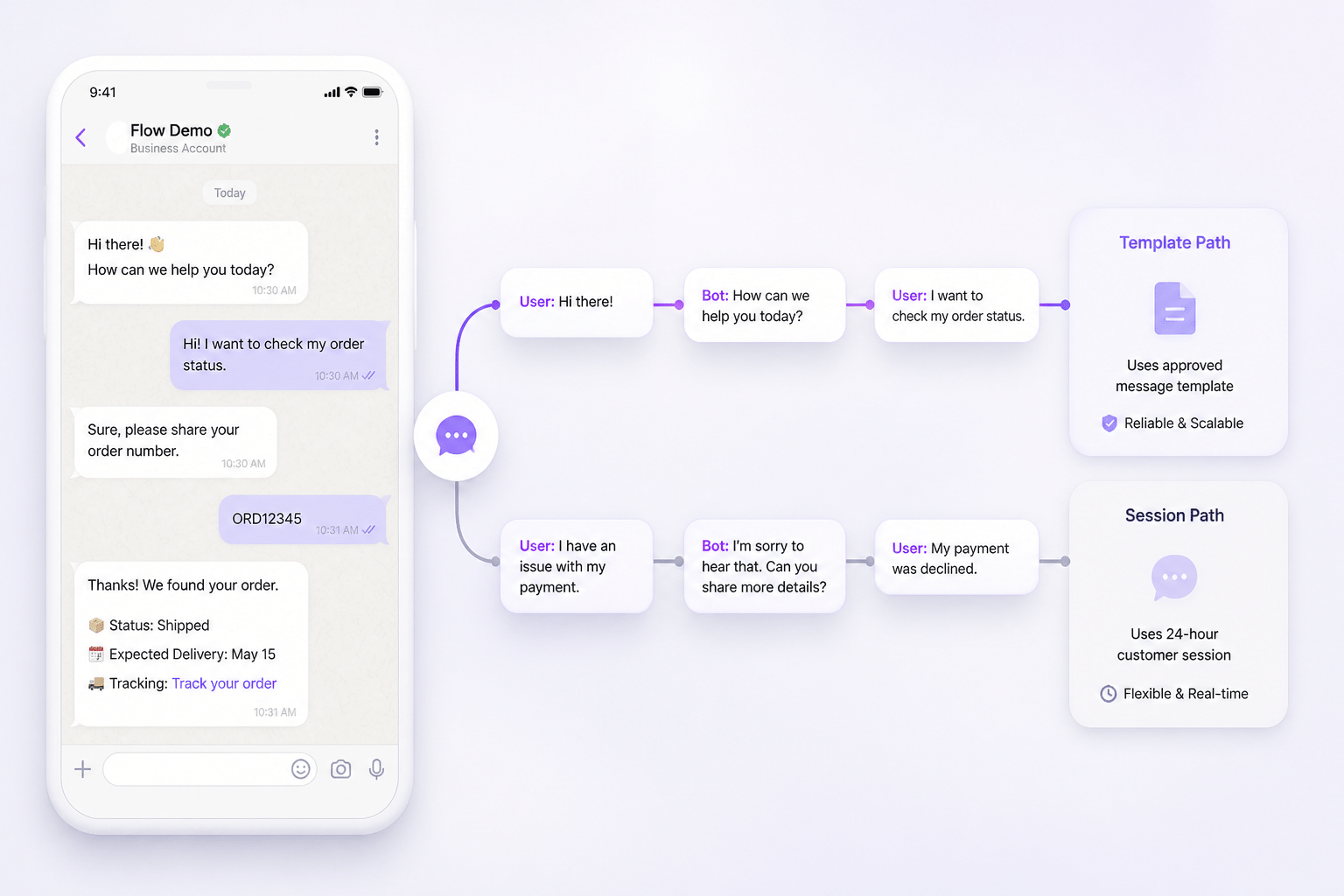
Here's a rule that surprises a lot of MSME owners. On the API, you can't message anyone, anytime, with anything. WhatsApp has two kinds of messages, and which one you use depends on who spoke first.
Get this right and your sales flow runs smooth. Get it wrong and your messages simply won't send.
Session Messages: When the Customer Starts the Chat
A session message is a reply to someone who wrote to you first. Say a buyer messages you about steel pipes at 2pm. That opens a 24-hour window. Inside it, you can reply freely. Text, photos, PDFs, catalogs, voice notes, quotes. No pre-approval needed.
And the clock resets every time the customer writes back. So an active chat can stay open for days.
Here's the window in simple steps:
Customer sends a message. The 24-hour clock starts.
You reply with anything you like.
Customer replies again. The clock restarts.
24 hours pass with no reply from them. The window closes.
Template Messages: When You Start the Chat
Once the window closes, or when you want to reach out first, you need a template. It's a message format that Meta approves before you use it. You write the text, mark the blanks (like the customer's name or quote number), and submit it. After approval, you fill in the blanks for each person.
Templates usually fall into three groups: marketing (offers and launches), utility (order and quote updates) and authentication (one-time passcodes). Think of them as a pre-checked letterhead. Meta looks at the wording once, so spam doesn't slip through later.
Here's a good one next to a bad one:
Good template | Bad template | |
|---|---|---|
Example | "Hi {{1}}, following up on your quotation {{2}} for {{3}}. Want us to revise the quantity? Reply 1 for a callback." | "BUY NOW!!! BEST PRICE!!! Limited offer, click here {{1}}" |
Why | Specific, useful, one clear next step | Shouty, vague, pushy, no reason for the buyer to care |
Likely result | Approved and replied to | Rejected, or blocked by buyers |
Why This Matters for Your Sales Team
This split isn't just paperwork. It nudges good habits.
First, it rewards speed. If a buyer writes in and you answer within the window, you can chat freely and close the deal in the same thread. Wait too long and you're stuck sending a template, which is more limited.
Second, it keeps your own messages clean. Templates have to be useful, so your broadcasts feel less like junk. That protects your quality rating, and a good rating keeps your reach healthy.
So reply fast, and save templates for the moments you truly need them. Next, let's look at how to actually get your account up and running.
How to Get Started with the WhatsApp Business API: An MSME's Guide
Here's the good news. Getting on the API isn't a six-month IT project. For most MSMEs, it takes about a week if your papers are in order. You just need to do three things, in the right order.
Step 1: Pick a Business Solution Provider (BSP)
You can't plug into the API directly. Meta works through partners, called Business Solution Providers. A BSP gives you the software, the inbox and the access. Lead Opal is one example, since its WhatsApp module comes with a shared inbox, broadcasting and sales tools in one place.
What should you look for? A few things matter most:
A shared inbox with chat assignment and notes
CRM links, so IndiaMart and ad leads flow in
Clear pricing, with Meta's charges shown separately from the provider's fee
Support that picks up the phone and helps with verification
One more thing. Make sure your business keeps ownership of its Meta account and phone number. If you ever switch providers, you don't want to be stuck.
Step 2: Get Your Business Verified
Next comes Meta Business Manager verification. It's how Meta checks that you're a real company. A good BSP walks you through this, so don't panic.
Keep these ready:
GST registration certificate
Udyam (MSME) registration, Certificate of Incorporation or partnership deed
Shop and Establishment licence, if you have one
A working website and business email
Here's the trick (and it's the one that trips most people up). Your legal name and address must match everywhere: GST records, Business Manager and the BSP form. Mismatches are a common reason for delays.
Step 3: Choose and Connect Your Phone Number
Now pick the number your buyers will message. A few rules apply:
It must be able to get an SMS or voice OTP.
It can't be active on another WhatsApp account. If it's on the Business App, you'll need to move it over or use a fresh number.
A new, dedicated number is usually the cleanest choice.
Once the OTP is confirmed, Meta reviews your display name. After that, you submit your first message templates and test everything.
The Whole Journey at a Glance
Step | What happens | Rough time |
|---|---|---|
1. Choose a BSP | Compare inbox, CRM links, pricing and support | 1 day |
2. Business verification | Submit documents in Meta Business Manager | 1 to 5 days |
3. Connect your number | OTP check and display name review | 1 to 2 days |
4. Templates | Submit and get approvals | 15 minutes to 48 hours |
5. Test and go live | Try inbound chats, routing and replies | 1 to 2 days |
Providers usually report 5 to 7 business days when documents are right. Mistakes can stretch it to two to four weeks. So don't wait until a big festive sale to start.
Once you're live, the real fun begins: connecting WhatsApp to your lead sources and sales tools.
The Real Power: Integrating WhatsApp API with Your All-in-One Sales Platform

Here's something I wish someone had told me earlier. The API on its own does very little for a sales team. It's a pipe, remember? Pipes don't close deals.
The real value shows up when you plug that pipe into a platform where your leads, chats, quotes and invoices already live. That's what Lead Opal does for Indian MSMEs. One system. No jumping between five tabs and a spreadsheet.
Let's look at three things that change once WhatsApp is connected properly.
Benefit 1: Leads Get Handled Without Anyone Lifting a Finger
Think about your 11am IndiaMart enquiry again. With Lead Opal's integrations, it doesn't sit in a dashboard waiting for someone to notice. The platform pulls it in, tags the source, picks a rep and sends a WhatsApp welcome message. All in seconds.
Here's the flow in plain steps:
IndiaMart lead arrives in your account.
Lead Opal captures it and adds it to your pipeline.
It auto-assigns to a sales rep by city, product or availability.
An automated WhatsApp welcome goes out, saying you got the enquiry and a rep will call soon.
The same thing works for TradeIndia, JustDial, Google Ads, Facebook Ads and website forms. You can build these rules with the drag-and-drop automation builder, so there's no developer to hire. And if a rep ignores a lead, you can set a reminder or nudge the manager.
This matters because buyers rarely wait. Earlier we saw how reply speed changes close rates. Automation is how a small team actually hits those five-minute replies, even at 10pm.
Benefit 2: A 360-Degree View of Every Lead
Now imagine opening one lead and seeing everything. WhatsApp chats. Email threads. SMS history. The deal stage. Who owns it and what was promised last Tuesday.
That's the pipeline view in Lead Opal. Nothing is scattered across phones and inboxes.
Why does that help? A few reasons:
A new rep can take over a chat and know the full story in a minute.
Managers can spot a stuck deal without calling anyone.
Nobody asks a buyer the same question twice (buyers hate that).
Your marketing person can see which source brings the leads that actually buy.
I'll be honest, this is the part owners tend to love most. It's the difference between guessing and knowing.
Benefit 3: From Chat to Quote to Invoice in One Place
Here's where deals usually slow down. The buyer says, "Send me a quotation." Then your rep opens Word, types it out, saves a PDF, switches to WhatsApp and attaches it. Maybe he makes a typo in the GST. Maybe it takes two days.
With everything in one platform, that gap closes. A rep can build a professional quotation (even with variations) from the same screen as the chat, then send it right away. When the buyer says yes, the sales or tax invoice follows from the same record, with a payment QR code on it.
Without integration | With Lead Opal |
|---|---|
Copy leads by hand from 4 dashboards | Leads flow into one pipeline |
Rep replies from a personal phone | Reply comes from the business number, often automated |
Quote made in Word or Excel | Quote created and sent from the chat |
Invoice made in a separate tool | Invoice and payment QR from the same system |
Fewer tools, fewer copy-paste mistakes, shorter sales cycle. Simple as that.
So the API gets you in the door. The platform around it is what keeps the whole sales floor moving.
Conclusion: Stop Juggling, Start Scaling with the WhatsApp Business API
Let's circle back to that 11am IndiaMart enquiry. Without a system, it's buried by evening under cricket jokes and wedding photos. With the WhatsApp Business API, it gets captured, assigned and answered before your rep finishes his chai.
That's really the whole story. The free app got you started, and it did its job. But if you're serious about growing a sales team, the move to the API isn't a nice extra. It's the step that turns scattered chats into a proper sales process.
Here's what you actually gain:
No more lead leakage. Every enquiry from every source lands in one pipeline with an owner.
Full visibility. You see who replied, what they said and how fast, without chasing screenshots.
Follow-ups that happen. Welcome messages, quote reminders and nudges run on their own.
A brand buyers trust. Replies come from one business number, with a verified look if Meta approves it.
One honest note. The API alone is only a pipe. The real payoff comes when it sits inside a platform where your leads, chats, quotes and invoices already live. And yes, that takes a bit of setup (about a week, if your documents are ready). But it's a week well spent.
So what's your next move? Start small. Pick a provider, get your GST and Udyam papers together, and choose a dedicated number. Then test one workflow before you scale.
Ready to Stop Juggling?
Ready to transform your sales process?
Discover how Lead Opal's all-in-one platform, with a built-in WhatsApp Business API module, can bring your leads, team chats, quotes and invoices into one place.
Your buyers are already messaging. Make sure someone answers.