

Introduction: Taming the WhatsApp Chaos in Your Business
India has at least 535.8 million WhatsApp users, and that's the early 2025 estimate. Industry guesses for 2026 run higher. So if your customers are anywhere, they're probably on WhatsApp.
And you already know it. Your dealer sends an order at 9pm. A buyer from IndiaMART pings your sales rep's personal number. Someone asks for a price list in a group with 240 people. It all happens on WhatsApp. Honestly, it works, until it doesn't.
Where the Chaos Starts

Here's the deal. Most Indian MSMEs run sales on personal phones. No shared inbox. No record of who replied to whom. No way for the owner to see what's going on.
So what happens? A lead sits unread for two days. Two reps send the same customer two different prices. A salesperson quits, and months of chats walk out the door with his phone. I can't give you an exact percentage of leads lost this way (nobody has a solid India-wide number), but you've probably felt it in your own business.
There's a policy risk too. WhatsApp prohibits bulk and automated messaging through unofficial methods, and personal numbers used this way can get banned.
Why Proper WhatsApp Software Matters Now
This is where whatsapp software comes in. Not as a fancy extra. As the thing that lets you grow without losing control.
Good software puts every chat in one shared place, helps you manage groups and dealer communities, and connects conversations to your lead pipeline. Think whatsapp group management, a shared inbox for your team, automation, and lead tracking, all working together.
In this guide, we'll walk through what's broken, what your options are, and how to pick the right fit. Let's sort out the mess.
Why Using Personal WhatsApp is Costing Your MSME Deals and Trust
Picture this. Your best salesperson, the one who closes the big dealer orders, resigns on a Friday. By Monday, his phone is gone. So are 14 months of chats, quotes, and promises made to customers. You're left asking buyers, "Can you send that again?"
It sounds dramatic. But it's a very normal Tuesday for lots of Indian MSMEs.
I should be upfront about something. I looked hard for a solid India-wide number on how many deals get lost this way, and there isn't one. Anyone quoting a neat "78% of leads lost" figure is probably guessing. What we do have are clear, documented risks. And they add up fast.
The Hidden Risks Nobody Talks About
Let's start with the quiet stuff. It doesn't hurt until the day it really hurts.
Lead Leakage: An enquiry lands on one rep's phone, he's busy, and nobody else can see it. It just sits there.
No backup when someone leaves: Personal WhatsApp has no shared ownership. If the employee walks out with the phone, your customer history may walk out too.
Mixed personal and work chats: Your rep's cousin's wedding photos sit right next to a Rs 4 lakh order. Awkward, and a bit risky.
Weak brand image: A quote from a random mobile number with a cartoon profile picture doesn't scream "trusted supplier."
Trust takes years to build. One confusing, unprofessional chat can chip away at it.
Where Daily Operations Fall Apart
Now let's talk about how work actually flows. Or doesn't.
Say a buyer finds you on IndiaMART and messages your rep on WhatsApp. Another fills out your website form and gets a reply from someone else. Neither lead is logged anywhere central. No pipeline stage. No reminder. No record that it ever happened.
Then comes handover. A rep goes on leave, and nobody knows what he promised the customer. Forwarding screenshots is not a handover process. It's a coin toss.
And the sales manager? Zero oversight. They can't see who replied, how fast, or what price was quoted. You can't coach what you can't see. Basic, but true.
Policy and Security Problems
Here's where it gets serious. WhatsApp's own rules say businesses should contact people only when they have the person's number and permission to message them on WhatsApp. Spam-like activity, scraping, and unofficial tools can lead to a ban, and WhatsApp says some bans are final if the review option isn't available. Third-party tools can't undo that. Only WhatsApp can.
Imagine losing your main sales number for good. Every customer who knew you by that number? Gone.
Then there's data security. Customer phone numbers, price lists, and payment details sit on personal devices with no role-based access, no audit trail, and no controlled offboarding. If a phone is lost or shared, you can't lock it down. Unofficial automation apps can make it worse by exposing customer data to third parties.
The Top 5 Risks at a Glance
Risk | What it looks like in real life |
|---|---|
Lead Leakage | Enquiries from IndiaMART or web forms sit unread on one person's phone |
Lost Customer History | A rep leaves and takes chats, contacts, and quotes with him |
Data Security Breaches | Sensitive customer data lives on unprotected personal devices |
Account Bans | Bulk or automated messaging from a personal number gets flagged |
Zero Management Oversight | Owners can't see replies, response times, or conflicting prices |
So what's the fix? It isn't "tell your team to be more careful." It's giving them a proper system. Next, let's look at what options you actually have.
Understanding Your Options: From the Free App to Integrated WhatsApp Software
So you've decided personal WhatsApp has to go. Good. But what do you move to? There are three real paths, and they're very different.
The Free WhatsApp Business App: A Good Start With a Low Ceiling
For a solo shop owner or a small clinic, the WhatsApp Business App is honestly fine. It's free. You get a business profile, labels, quick replies, away messages and a catalogue.
But it runs out of room fast. A business account can be used on up to five linked devices, and that's about it for teamwork. There's no proper shared inbox, no lead routing, and no CRM link. WhatsApp also limits how many new chats you can start with people who haven't messaged you first. Hit the cap, and you wait until next month.
So it works for one person answering inbound questions. It doesn't work for a sales floor.
The WhatsApp Business API: Powerful, But Not an App
Here's where people get confused. The WhatsApp Business API (now called the WhatsApp Business Platform) isn't something you download. There's no icon, no screen. It's an official connection point that lets software talk to WhatsApp.
That means you need a whatsapp management tool for business sitting on top of it. Something that gives you the inbox, the templates, the automation and the reports. Lead Opal is one example of this kind of layer.
What do you need to get started? A verified Meta business profile, a dedicated number, and approved message templates. And yes, there are fees. From 1 October 2026, Meta's reported India rates are about ₹0.8631 per marketing message and ₹0.115 per utility message, before tax. Your software vendor adds its own fee on top.
Standalone Tools vs. All-in-One Platforms
Now the second fork. Plenty of tools only do one job. A broadcaster sends campaigns. A shared inbox handles replies. A separate CRM tracks deals. You end up stitching three tabs together, which is the same mess in a nicer coat.
An all-in-one platform puts the shared WhatsApp inbox for teams, the CRM, lead capture and marketing automation in one place. One source of truth. When an IndiaMART lead arrives, it's assigned, messaged and tracked without copy-pasting.
Here's how the three main routes compare:
Personal WhatsApp | WhatsApp Business App | WhatsApp API Software | |
|---|---|---|---|
User limit | One phone, one person | Up to 5 linked devices | Many agents on one number |
Automation | None | Greeting and away messages, quick replies | Chatbots, routing, reminders, workflows |
CRM integration | None | None | Built in or connected |
Lead tracking | Memory and screenshots | Basic labels | Pipeline stages, owners, history |
Scalability | Breaks quickly | Fine for micro-businesses | Built for growing teams |
If your team is bigger than two or three people, the last column is usually where you'll land. Next, let's tackle a problem that trips up almost every dealer-led business: the WhatsApp group.
The Specific Challenge: Effective WhatsApp Group Management for Business
How many WhatsApp groups is your sales head sitting in right now? I'd guess 30, maybe more. Dealer groups, team groups, a "Diwali offers" group nobody remembers creating.
Groups aren't the enemy. They're actually a good fit for how Indian trade works. But they get messy fast.
Where Groups Actually Help
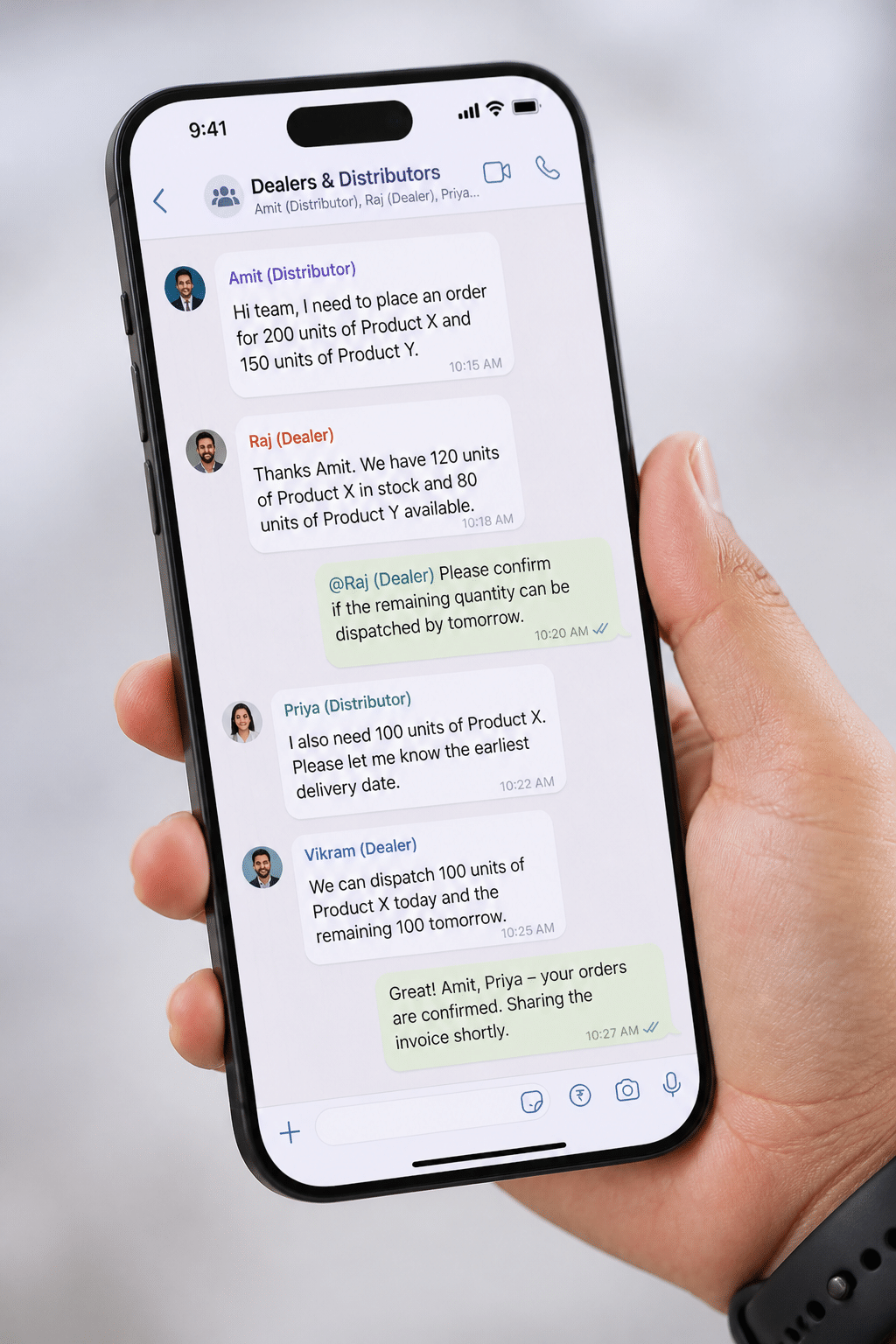
Here are the top 3 use cases for WhatsApp groups in B2B trading:
Internal sales coordination: Reps share stock updates, price approvals and urgent escalations in one place, so the manager doesn't chase five people.
Distributor and reseller communities: Dealers talk about stock, orders and service issues, sometimes with each other. Think "Tamil Nadu Electrical Dealers" or "North India Spare Parts."
VIP customers and project clients: A small group for your top 20 buyers, or one group per big project, keeps updates fast and personal.
The pattern is simple. Small, clear purpose, right people. That's when groups shine.
Where Standard Groups Fall Short
The trouble starts when a group grows past 50 people and nobody owns it. Here's what usually goes wrong:
Thin permissions. By default, any member can edit the group name or icon. Admins can lock this, but there's no real role-based control beyond that.
Everyone sees everyone. Members can generally see each other's phone numbers. Not ideal when one dealer is a competitor of another.
Hard to track replies. Did the buyer in Surat answer the quote? Scroll up. Keep scrolling.
Noise wins. A price list gets buried under 80 good-morning images by lunch.
And there's the bigger worry. If the group is the only record of an order, then a chat that gets deleted, or an admin who quits, takes that record away with it.
How Group Management Software Changes the Game
This is where whatsapp group management software comes in. Honestly, the biggest shift is a small one: decide who gets what before you create a group.
Good tools let you segment contacts first. Tag dealers by territory, product line or tier, then send updates only to the right slice. For one-way news like price lists or dispatch alerts, a broadcast list (or an approved API template) is far cleaner than a group. Each person gets the message privately. No one sees anyone else's number, and nobody can reply to the whole crowd.
For real two-way groups, WhatsApp's own guidance says businesses can invite customers through a link, and joining is optional. That's better than adding people without asking.
A word of caution, though. Groups on the official API work differently from normal ones. They're invite-only, so ask any vendor exactly what they support before you promise your dealers anything.
Lead Opal's WhatsApp module takes this segment-first approach. It combines audience segmentation, a shared inbox and campaign management, so your announcements go out in a controlled way and the replies land where your team can see them.
Groups are only one piece, though. Next, let's look at what a complete WhatsApp management tool should actually do.
Beyond Groups: Key Features of a Complete WhatsApp Management Tool
Groups fix one slice of the mess. The rest happens in one-to-one chats, which is where quotes get sent and orders actually get confirmed. A proper whatsapp management tool for business handles three jobs: a shared inbox, a CRM link, and automation. Miss one, and you'll feel the gap pretty fast.
Want to stop losing leads?
See how Lead Opal helps you capture, track, and follow up on every lead — automatically, across WhatsApp, Email & SMS.
Why a Shared Inbox is a Game-Changer for Sales Teams

Picture one dashboard. Every chat your team has is sitting there. Your manager can open it on Monday morning and see who replied, who didn't, and what price went out.
That's a shared whatsapp inbox for teams. Several reps and managers view and answer conversations from one screen, using one number or a few. No more "which phone has that chat?" It also means a rep going on leave doesn't freeze a deal. Someone else opens the thread and carries on.
Here's what to look for:
Chat assignment: each conversation has a clear owner.
Internal notes: your team can leave comments the customer never sees.
Role-based access: a new hire sees only what they should.
Both personal and API numbers: handy if your reps already have customers on their own numbers.
Lead Opal's WhatsApp module includes a dedicated shared inbox that manages sales reps' WhatsApp numbers, both personal and API-based. So you don't have to move everyone overnight.
CRM Integration and Lead Tracking
A shared inbox alone is just a nicer mailbox. The real value shows up when chats connect to your leads.
Good whatsapp crm integration works like this. A message arrives from a new number, and a lead is created automatically. Every message, quote and file after that gets attached to that lead's profile. Months later, you can open the record and see the whole story, from first hello to final order.
This is also how lead management on whatsapp stops being guesswork. Leads from IndiaMART, TradeIndia, JustDial, Google Ads or your website forms land in the same pipeline as the WhatsApp ones. Each lead has a stage, an owner and a next step. A pipeline view means no lead sits untouched because it "came through a different door."
Nobody has to copy anything into a spreadsheet. Honestly, that alone saves a lot of evenings.
Automation and Templated Replies
Now the part owners get excited about. A whatsapp automation tool can handle the repetitive stuff so your reps spend time selling.
Three jobs it usually does well:
Welcome messages: a new enquiry gets an instant, friendly reply, even at 11pm.
Smart assignment: new chats go to the next available rep, or the one who handles that territory.
Reminders: if a lead goes quiet, the system nudges your team to follow up.
Templates matter here too. Once a customer messages you, you get a 24-hour customer-service window where you can reply freely. After it closes, you need an approved template to send the next message. So it pays to prepare approved templates for common needs: quotes, FAQs, payment reminders, dispatch updates. Your team sends the same clear wording every time, and nobody retypes the price list for the fifteenth time.
Keep your templates in separate buckets, too. Keep promotions apart from order updates. It makes approvals smoother.
Lead Opal pairs this with its drag-and-drop automation builder, so routing and follow-ups can run without a developer on your payroll.
So, what does this look like in a real Indian trading business? Let's find out next.
Case Study: How Indian MSMEs are Driving Growth with Unified WhatsApp Software
Let's make this real. I couldn't find a published case that matches every detail below, so I'll mix one real example with a realistic composite. I'll flag which is which.
A Real Distributor That Fixed Its Follow-Up
Trishla Electricals is a Maharashtra distributor of solar panels, inverters and related parts. Its growth leaned on field sales and slow, manual follow-up. Then it changed the setup. Every Meta Ads lead got an instant WhatsApp message with a catalogue, pricing overview and a prompt to book a call.
According to the published case study, monthly leads grew from 12 in one state to 70 to 90 across Maharashtra, Gujarat and Rajasthan. That's an agency's own claim, not an audit. But the pattern makes sense. A fast, consistent reply beats a slow, perfect one.
A Composite: One Trader, Three Lead Sources
Now picture a pump-fittings trader in Rajkot (illustrative, not a named client). Leads come from IndiaMART, JustDial and the website form. Before, someone checked three dashboards and typed details into Excel. Some leads got answered at 8pm. Some never did.
With Lead Opal, all three sources feed one pipeline. That's the whatsapp crm integration doing its job: a new enquiry becomes a lead, gets assigned by territory, and the rep opens the chat from the shared inbox. Nobody copies anything. Every lead has an owner, and every message stays on the record.
One pipeline, one inbox, one owner per lead. That's the whole difference.
What the Sales Manager Finally Sees

Here's the part owners tend to love most. The manager opens one dashboard and sees who replied, how quickly, and what price went out. Conflicting quotes get caught early. A rep who sits on leads shows up fast.
Plus, conversations can be read for quality, so coaching uses real chats instead of guesses. And targets? They can be set per rep and tracked weekly, monthly or quarterly, based on actual WhatsApp activity and closed deals, not verbal check-ins. You can't coach what you can't see, remember?
The Old Way vs. the New Way
Here's one lead, start to finish:
Step | Old way (manual, chaotic) | New way (integrated) |
|---|---|---|
Lead arrives | Sits in a marketplace dashboard | Lands in the pipeline automatically |
Assignment | Someone eventually notices it | Auto-assigned by rule or territory |
First reply | Hours later, from a personal phone | Instant welcome message, then the rep follows up in the shared inbox |
Quote | Typed in Word, sent as a screenshot | Created and sent from the same platform |
Follow-up | Depends on memory | Automated reminders |
Closing | Status lives in someone's head | Deal stage and history tracked in one place |
Fast, tracked and boring in the best way. Seeing it work is one thing, though. Picking the right tool is another, so let's build you a checklist next.
Your 2026 Buyer's Checklist: How to Choose the Right WhatsApp Software
You've seen what's broken and what the options look like. Now comes the part where people freeze. There are dozens of tools, every demo looks shiny, and every vendor says "best whatsapp software for msme." So how do you pick one without regretting it in six months?
Here's a simple checklist. Print it, or paste it into your notes before your next demo.
Your 7-Point Checklist for Choosing WhatsApp Software
# | What to check | What a good answer looks like |
|---|---|---|
1 | WhatsApp Business API provider | Official access, not an unofficial add-on. They explain onboarding, number migration and what happens if a number gets restricted. |
2 | Integration with sales pipeline | Every chat links to a lead with a stage, an owner and history. No copy-pasting. |
3 | India marketplace connectors | Built-in links to IndiaMART, TradeIndia and JustDial, plus Google Ads and Facebook Ads. |
4 | Roles and permissions | You decide which modules and chats each rep can see and use. |
5 | Shared inbox and automation | Chat assignment, internal notes, routing, reminders and approved templates. |
6 | Billing and GST invoicing | Quotes and tax invoices from the same platform, ideally with payment QR codes. |
7 | Clear total pricing | One quote covering the subscription, Meta message fees, GST, extra seats and setup. |
None of this is fancy. But skip one, and you'll feel it later.
Must-Have Integrations for India
A global tool can look great and still fail your business. Why? Your leads don't come from where Silicon Valley thinks they do.
Ask to see the connector working, live. Not a logo slide. If most of your enquiries come from IndiaMART, TradeIndia or JustDial, those leads should drop into your pipeline on their own. Same for Google Ads, Facebook Ads and website forms. Payment links and QR codes matter too, since Indian buyers love paying by UPI.
One trap to watch for. A vendor may say "we integrate with everything," and then it turns out to need Zapier or a developer. That's the freelancer bill you were trying to avoid.
Scalability and Team Management
You might have four reps today. Maybe twenty next year. So ask what happens at twenty.
Role-based permissions are the big one. A new hire shouldn't see every price list, and a rep shouldn't open another rep's deals. Good software lets the owner hand each person only the modules they need. Also check how it handles more users, more chats and more numbers, and whether pricing jumps sharply per seat. If you've ever been burned by a plan that looked cheap until you added people, you know why this matters.
All-in-One or a Single-Purpose Tool?
Here's the honest answer: it depends. If you only need to blast a monthly offer to 500 dealers, a simple broadcaster might do. It's cheap and quick.
But most trading and manufacturing teams need more. Lead tracking, quotations, GST invoices, email and SMS all sit around the WhatsApp chat. Buy them separately, and you're back to reconciling data between five tabs. An all-in-one platform like Lead Opal bundles the shared inbox, lead pipeline, invoicing, email, SMS and automation. For a growing team, that usually gives better long-term value than stacking point tools.
One last tip. Test any vendor with your own price list and your own order flow. That tells you more than any brochure.
Once you've picked a tool, what's the smartest way to start? Let's wrap it up next.
Conclusion: Move from Communication Chaos to a System for Growth
Let's bring it back to where we started. Personal WhatsApp is great for chatting with your cousin. It's not built to run a sales floor.
Once you have a team, lots of leads and real money on the line, scattered chats become a risk. Leads sit unread. Prices clash. Customer history walks out with a resigning rep. None of that is about your people being careless. It's about having no system.
The fix, honestly, isn't complicated. The right whatsapp software puts every chat in one shared place, links it to your lead pipeline, gives managers a clear view of replies and quotes, and handles the boring repeat work for you. Your reps sell. The system keeps score.
Here's your next step, and it's a small one. This week, audit how things work today. Count the phones holding customer chats. Check how many leads arrive from IndiaMART, JustDial or your website, and who actually follows up on each. Write down where things slip. That list is your shopping brief.
Then stop stitching together a broadcaster here and a spreadsheet there. Pick one unified platform and start with a single workflow, like lead assignment or follow-up reminders. Build from there.
The market is heading this way too. India's conversational-commerce market is forecast to reach $18.39 billion by 2030, up from $14.11 billion in 2026. More buying will happen in chat. The businesses ready for it will be the ones with an organized system behind the conversation.
Ready to see how a unified WhatsApp platform could bring your leads, team conversations and follow-ups into one place? Explore Lead Opal and find a workflow that fits your business.
WhatsApp isn't just a chat app anymore. Treat it like the sales channel it is, and give it a system that can grow with you.