

Stop Losing Sales: Why Your Spreadsheet and WhatsApp Can't Manage Your Leads Anymore
Picture a Monday morning. Your IndiaMart panel shows 14 new enquiries. TradeIndia has 6 more. Google Ads sent a few, and the website form quietly collected three over the weekend. Someone says, "I'll copy them into Excel later."
Later never comes. Not on time, anyway.
That's the everyday mess for lots of Indian MSMEs. Leads pour in from five or six places, and nobody's sure who owns what. One 2026 industry estimate puts spreadsheet or manual lead tracking among Indian SMB sales teams at 62%, though the source should be double-checked. Even if the real number is lower, you probably know the feeling.
The usual fixes don't hold up. Excel has no reminders. Personal WhatsApp numbers leave with the salesperson who quits. And small businesses already juggle an average of 4.8 digital tools, before you count informal chats. Every gap between tools is a place where a lead can slip away.
Speed matters more than most of us think. A Harvard Business Review study of 2,241 companies found that contacting an online lead within five minutes made it 21 times more likely to qualify than waiting 30 minutes.
So what should you look for instead? This guide walks business owners and sales managers through 8 must-have features of the best lead management software. The goal is simple: one connected sales process, fewer missed follow-ups, and steady growth. Let's start with the feature that stops the chaos at the source.
1. Centralized Multi-Channel Lead Integration

This one comes first for a reason. If leads don't land in one place, nothing else on this list can help you.
So what is it? It's software that automatically pulls in leads from every source you use. IndiaMart. TradeIndia. JustDial. Google Ads. Facebook. Your website form. All of them flow into one pipeline, without anyone copying and pasting.
From Chaos to Clarity
Here's the picture. Think of each lead source as a separate tap, and your software as the one bucket underneath.
Where leads come from | What happens with the right software |
|---|---|
IndiaMart and TradeIndia enquiries | Land in your pipeline as they arrive |
JustDial enquiries | Captured with the source tagged |
Google Ads and Facebook Ads | Sent straight in, with campaign details |
Website and custom forms | Added instantly, no manual entry |
Anything else (webhooks) | Connected through a custom link |
Why it matters for MSMEs
Manual entry is slow, and slow is risky. Take JustDial. Leads can show up through a panel, an API, notifications or spreadsheet exports, so someone has to keep watching four different places. RMDialer's integration guide notes that one common setup only checks for new leads every 30 minutes. That's a long wait when the buyer is also messaging your competitor.
Copying leads by hand also drops details. The source goes missing. Duplicates creep in. Then nobody can tell which channel actually brings in paying customers.
One shared pipeline fixes that. Everyone sees the same lead, the same owner and the same next step. It's the base of any good lead tracking software in India.
There's real proof that this pays off. A 2026 case study from BotPenguin shows an aluminium casting business cutting daily follow-up work from 4 to 5 hours down to 30 minutes after pulling IndiaMart, Facebook and website enquiries together. It's a vendor-published result, so treat it as one customer's story. Still, it's a big gap.
How to check for it
You don't need to be technical. Just ask these questions during a demo:
Does it connect directly to IndiaMart, TradeIndia and JustDial?
Can it pull leads from Google and Facebook ads?
Is there a custom form builder for your website?
Does it support webhooks, for sources that don't have a ready-made link?
Does it remove duplicates and keep the original source on every lead?
If the answer to most of these is yes, you're looking at a strong IndiaMart lead management software option. Leadopal, for example, connects all of these sources into one pipeline.
Once every lead lands in one spot, the next question is how you talk to them. That's where WhatsApp comes in.
2. Integrated WhatsApp Business API Module
Here's a scene I bet you know. A salesperson quits on a Friday. Their phone goes with them. So do 200 customer chats, three half-finished quotes and a promise to call back on Monday.
Nobody can see any of it.
That's the problem with running sales on personal WhatsApp numbers. And since one 2026 industry report says around 80% of Indian small businesses use WhatsApp to talk to customers, a lot of us are sitting on this risk right now.
What it actually is
This feature goes well beyond sending messages. A proper WhatsApp module gives you three things:
Official API access, so you can send bulk broadcasts to many customers at once
A shared team inbox, where everyone's conversations show up in one place
Chat linking, so each conversation sits right inside the lead's profile
That last one is a big deal. You open a lead and see the whole story: the enquiry, the quote, the WhatsApp replies. No hunting through phones.
Why it matters for MSMEs
Personal numbers give management zero visibility. You can't check what was promised. You can't step in when a deal gets stuck. And you can't keep the history when someone leaves.
A 2026 Primus Partners report warns that WhatsApp can create a "false sense of operational privacy" for businesses. Pricing talks and product plans can sit in informal chats with no one overseeing them.
A shared inbox fixes this. Chats stay with the company, not the person. It also makes you look more professional, which buyers notice. This is the heart of good WhatsApp lead management.
Here's how the two setups compare:
Personal WhatsApp chats | Shared team inbox with the API |
|---|---|
Chats live on each rep's phone | Chats stored in one company account |
Manager can't see conversations | Manager can view and step in |
History leaves with the employee | History stays linked to the lead |
One-by-one messaging only | Bulk broadcasts to chosen groups |
No tracking of replies | Delivery and reply tracking |
How to choose the right one
Not every tool is built the same, so check a few things:
Official Meta API. Pick a platform that connects the proper way. Workarounds can get your number banned, and that's a nasty surprise.
Audience segmentation. You want to send a offer to "Pune dealers" and not to everyone.
Unified inbox. Your whole team should work from one screen.
CRM link. Chats should attach to the lead automatically.
Leadopal, for example, offers official API access, a shared inbox that can manage reps' numbers (personal and API-based), and segmented campaigns.
Once conversations are under control, the next job is making sure follow-ups happen without anyone remembering to do them. That's where automation comes in.
3. Drag-and-Drop Automation Builder
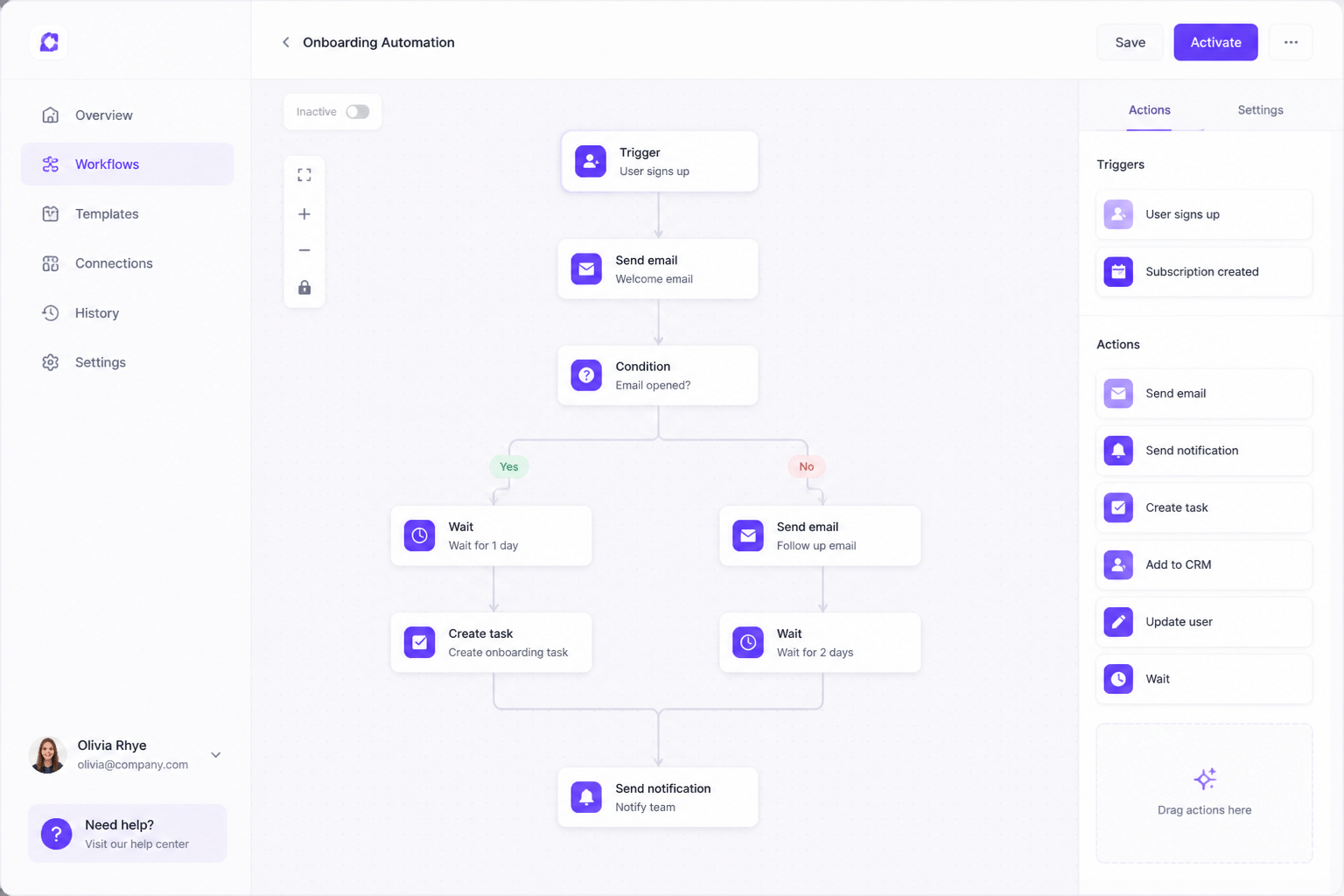
Here's a question. How many times today did someone on your team copy a lead, paste it somewhere, and then set a reminder in their head?
That's the work an automation builder takes off your plate.
What it actually does
It's a visual workflow builder. You drag blocks onto a screen, link them with lines, and the software runs the steps for you. No code. No developer. If you can draw a flowchart on a napkin, you can build one.
Some simple examples:
Auto-assign a new lead to the right sales rep
Send an instant welcome message on WhatsApp
Set a follow-up reminder for day 2 and day 5
Alert a manager if a lead sits untouched
This is the core of any automated lead follow-up system.
Why it matters for MSMEs
Leads don't wait for office hours. An enquiry that lands at 9pm on a Saturday still wants a reply. With a rule in place, the buyer gets a message within seconds, while your team is asleep or at a wedding.
There's a second payoff. Salesforce research, as reported in a sales productivity breakdown, suggests reps spend only about 28% of their week actually selling. The rest goes to admin, CRM updates and scheduling. I can't vouch for that number in an Indian MSME specifically, but the pattern feels familiar, doesn't it?
Automation gives that time back. Your people sell, and the software handles the busywork. For a small team with a growing pile of leads, that's often the difference between a good month and a missed one.
How to test it before you buy
Don't just watch the demo. Build something yourself. Try this rule:
If the lead source is IndiaMart, assign to Sales Rep A and send WhatsApp Template X.
Then ask yourself a few things:
Did it take under 10 minutes?
Could a non-technical person on your team do it?
Can you add a time delay, like "wait 2 days, then remind"?
Is there a stop rule, so messages end once the lead replies?
If you get stuck on step one, that's your answer. Leadopal's builder, for example, lets you set up lead routing and follow-ups this way, without any coding.
A short screen recording of a simple lead routing flow being built is worth watching here, since seeing the blocks connect makes it click faster than any description.
Once leads are routed and followed up automatically, you'll want a clear picture of where each one stands. That's next.
4. Visual Sales Pipeline Management
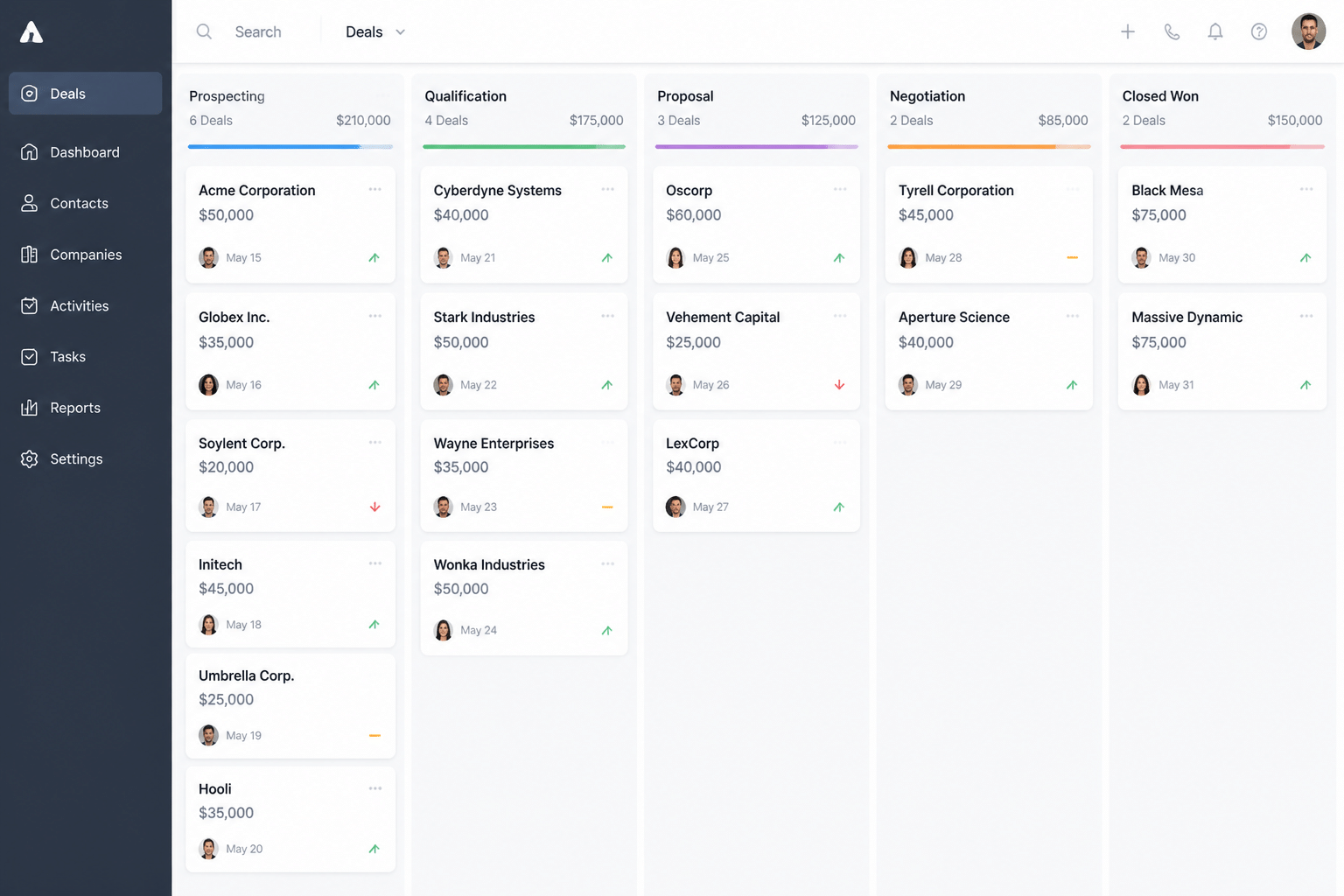
You know that spreadsheet with 400 rows and six colour codes only one person understands? Yeah. That one.
A visual sales pipeline is the cure. It's a Kanban-style board, a bit like sticky notes on a wall, where every lead sits in a column that shows its stage. New. Contacted. Quotation Sent. Won. Each card also shows who owns the deal.
Why a board beats a spreadsheet
Picture the two side by side. On the left, a crowded sheet where you scroll, squint and still can't tell which deals are stuck. On the right, a clean board where stuck deals are obvious in about five seconds.
Spreadsheet view | Visual pipeline view |
|---|---|
Rows and rows of plain text | Cards sorted into clear stages |
Hard to spot stuck deals | Stalled leads stand out quickly |
Owner buried in a column | Owner shown on every card |
Forecasting means manual maths | Value per stage is easy to add up |
For an MSME owner, this changes the Monday meeting. You stop asking "what's happening with that Pune order?" and just look. If twelve deals pile up at "Quotation Sent" and nothing moves to "Won", you've found the problem. Maybe quotes go out late. Maybe follow-ups don't happen. Either way, you can see it.
It also helps with forecasting. When you know how many deals sit in each stage, guessing next month's revenue gets a lot less like guessing.
Set it up to match how you actually sell
A good sales pipeline management tool lets you rename and reorder stages. That matters, because a trader and a manufacturer don't sell the same way. A factory might need "Drawing Review" and "Sample Sent". A wholesaler might need "Stock Check" and "Credit Approval".
A few tips from what usually works:
Keep stages few. Five to seven is plenty.
Name stages after what the buyer is doing, not your internal paperwork.
Give every deal one owner and a next step with a date.
Check that moving a card is just a drag and drop. If it takes five clicks, your team won't bother.
Leadopal, for example, gives you a drag-and-drop board with stages you can customise, so each lead shows its owner and status at a glance.
Once your pipeline is clear, the next step is turning a warm deal into a quote and then an invoice, without leaving the system.
5. Integrated Quotation and Invoicing Suite
Quick question. How long does one quotation take your team in Word? Find the old file, swap the name, fix the rate, redo the GST maths, save as PDF, attach. Now repeat that 15 times a day.
Painful, right?
What it actually is
This feature lets you create, send and track quotations and GST invoices straight from the lead's profile. No jumping to another tool. You open the lead, click a button, and the document is ready with the customer's details already filled in.
Want to stop losing leads?
See how Lead Opal helps you capture, track, and follow up on every lead — automatically, across WhatsApp, Email & SMS.
Why it matters for MSMEs
Hand-made documents break easily. A wrong tax rate. A missing GSTIN. Last customer's name left in by mistake (awkward!). The CBIC lists what a GST tax invoice has to carry, like the supplier's GSTIN, a running serial number, HSN code, tax rate and place of supply. Software fills these in for you, so there's less to forget.
Speed counts too. I couldn't find a solid India-wide number for how long manual quotes take, so I won't make one up. But a good tool should get you to "minutes, not hours." And a quicker quote usually means a quicker order and a quicker payment.
One 2026 benchmark report found invoices paid through an integrated payment product had a 38 day DSO, against a median of about 40 days overall. That's a small gap, and it's broad B2B data, not Indian MSMEs. Still, fewer payment hurdles tends to help.
What a good invoice looks like
Here's a simple picture of what a software-made invoice should show:
Invoice area | What you should see |
|---|---|
Header | Your company logo, name, address and GSTIN |
Document details | Invoice number, date and place of supply |
Customer block | Buyer name, address and GSTIN (if registered) |
Item lines | Description, HSN code, quantity, rate and discount |
Tax breakdown | CGST, SGST or IGST shown line by line |
Totals | Taxable value, total tax and final amount |
Payment area | Bank details and an embedded UPI QR code |
Footer | Signature and your terms |
That QR code is small but handy. Your customer scans, pays, done.
What to look for
Templates that carry your own branding
Quotations with options or variations, like different quantities
Multi-currency support, if you sell abroad
Embedded payment QR codes
Status tracking, so you know what's sent, viewed or paid
Leadopal, for example, covers quotations with variations, sales and tax invoices, multi-currency billing and payment QR codes in the same system as your leads.
Once quotes and invoices flow smoothly, the next question is whether your reps are actually hitting their numbers.
6. Sales Team Performance & Target Management
How does your Monday review go right now? If it's "So, how's the month looking?" followed by a few shrugs, you're not alone. Lots of MSME owners run targets on gut feel and hallway chats.
That works with two reps. It falls apart with eight.
What it actually is
This is a module where you set weekly, monthly or quarterly targets for each sales rep, then watch progress in real time. Think of a scoreboard. Each person has a goal, a running total and a clear gap to close.
A good dashboard shows something like this:
Sales rep | Monthly target | Achieved so far | Progress |
|---|---|---|---|
Rep A | ₹8,00,000 | ₹6,40,000 | 80% |
Rep B | ₹5,00,000 | ₹2,00,000 | 40% |
Rep C | ₹6,00,000 | ₹6,30,000 | 105% |
You don't need to ask anyone anything. You can see that Rep B needs help and Rep C is flying.
Why it matters for MSMEs
It moves accountability from verbal check-ins to actual numbers. And that's kinder than it sounds. Reps know what's expected, and managers can coach with facts instead of hunches.
I'll be upfront: I couldn't find a solid study showing that open tracking raises motivation or keeps staff longer in Indian MSMEs. So I won't claim one. But the logic holds up. When goals and progress are visible, nobody's guessing what "good" looks like.
It also helps you spot patterns. Maybe a rep with low sales is working plenty of leads but closing few. That's a coaching problem, not a laziness problem.
What to look for
A clear view of target versus achievement for every team member
Weekly, monthly, quarterly and yearly targets
History you can drill into, so you can compare this quarter with last
Targets tied to real pipeline and invoice data, not manual updates
Leadopal, for example, lets you assign targets per rep and look back at performance across weekly, monthly, quarterly and yearly periods.
Once you can see how each person is doing, the bigger question is what's driving results across the whole business. That's where reporting steps in.
7. Unified Analytics and Reporting
Here's a question that stumps a lot of owners. Which lead source brings you your best customers? Not the most enquiries. The best customers.
If you had to guess, you're not alone. When data sits in IndiaMart's panel, a Facebook ads dashboard, a WhatsApp phone and a spreadsheet, nobody can answer it with confidence.
What it actually is
Unified analytics is one central dashboard that shows how your whole sales and marketing effort is doing. Think of it as a 360-degree view. You'll usually see:
Lead source effectiveness (where leads come from, and which ones turn into paying customers)
Conversion rates for each salesperson
Campaign results for WhatsApp, email and SMS
A simple version looks like this:
Chart | What it tells you |
|---|---|
Pie chart: Leads by Source | Which channels send the most enquiries |
Bar chart: Deals Won per Sales Rep | Who is closing the most business |
Campaign report | How each WhatsApp, email or SMS blast performed |
Why it matters for MSMEs
Good reports let you answer real questions. Should we spend more on Google Ads or stay put on IndiaMart? Is Rep A really better, or does Rep A just get easier leads?
Here's a story from outside India that shows the idea. Impact Enclosures is a Florida company that tracked each lead source all the way to closed deals. After eight months, it moved budget away from weak campaigns and into the ones that actually brought in revenue. It's a different market, sure, but the lesson travels well. Cheap leads aren't always good leads.
When your numbers are scattered, you can't see this. You just feel busy.
What to look for
You shouldn't need a data analyst to read your own reports. Check for these:
Simple visual charts, not walls of numbers
Filters by date, team member and lead source
Separate views for WhatsApp, email and SMS campaigns
Reports built from the same data as your pipeline and invoices
Leadopal, for example, has a central dashboard for overall performance, plus dedicated analytics for WhatsApp, email and SMS.
Once you can see the numbers, the next question is who gets to see what. That's where access control comes in.
8. Role-Based Access and Permissions
Picture this. You hire a sales intern on Monday. By Wednesday, they can see your price list, every customer's phone number and the full revenue report. And a delete button that wipes the lot.
Yikes.
What it actually is
Role-based access is a security feature that lets the owner decide what each person can see and do inside the software. You don't hand everyone the master key. You give each person a role, and the role decides which modules and actions they get.
So a rep sees their own leads. A manager sees the whole team. You, as the owner, see everything.
Why it matters for MSMEs
As your team grows, mistakes get more expensive. One wrong click can delete active deals. One unhappy employee with export rights can walk off with your whole customer list. Verizon's 2025 breach research flags misuse of legitimate access as a repeating problem, and small businesses aren't exempt.
I couldn't find a public case of an Indian MSME losing money from a badly set up role. So I won't pretend there's one. But the risk is easy to picture, isn't it?
Good permissions also protect people from themselves. A rep can't change a price or reassign a big deal by accident if they never had the power to do it.
Roles you might set up
Here's a simple starting point:
Role | Can do | Can't do |
|---|---|---|
Sales Rep | View and update own leads, send quotes | Export data, delete records, see company reports |
Sales Manager | View team's leads, reassign deals, see reports | Change billing or user settings |
Accounts / Admin staff | Create invoices and quotations | Edit pipeline stages or delete leads |
Owner / Admin | Full access, manage users and roles | Nothing is off limits |
How to set it up properly
Start small. Give people the least access they need, then add more only when a real task demands it. Four roles are usually plenty at the start.
When you test a tool, ask a few things:
Can I create custom roles, not just fixed ones?
Can I choose which modules each role sees?
Can I block export and delete for certain users?
Can I switch off a person's access in one click when they leave?
Leadopal, for example, offers granular, role-based access, so you assign only the modules each user needs.
With your data safe and your team organised, you've got all eight features. Next, let's see how they stack up against the problems you're facing.
Quick Comparison: Which Lead Management Features Solve Your Biggest Problems?
Short on time? Here's the whole list on one screen. Find the headache that sounds most like your Monday morning, then check which feature fixes it.
Feature | Problem It Solves | Key Business Benefit |
|---|---|---|
1. Centralized Multi-Channel Lead Integration | Leads scattered across IndiaMart, TradeIndia, JustDial, ads and website forms | Every lead lands in one pipeline with its source tagged |
2. Integrated WhatsApp Business API Module | Sales chats stuck on personal phones, gone when a rep leaves | Shared inbox, chat history stays with the company |
3. Drag-and-Drop Automation Builder | Manual copying, forgotten follow-ups, slow replies | Instant routing and reminders, more time spent selling |
4. Visual Sales Pipeline Management | Deals buried in a 400-row spreadsheet | Stuck deals show up in seconds, forecasting gets easier |
5. Integrated Quotation and Invoicing Suite | Slow, error-prone quotes and GST invoices in Word or Excel | Faster quotes, cleaner paperwork, easier payment |
6. Sales Team Performance & Target Management | Targets tracked by gut feel and verbal check-ins | Clear scoreboard, coaching based on facts |
7. Unified Analytics and Reporting | No idea which source brings the best customers | Smarter spending on the channels that actually pay off |
8. Role-Based Access and Permissions | Everyone can see, export or delete everything | Customer data stays safe as the team grows |
How to use this table
Don't try to fix all eight at once. Pick the one or two rows that hurt most right now.
Losing leads before anyone calls them? Start with rows 1 and 3. Worried about chats leaving with staff? Row 2 is your first stop. Can't tell who's hitting targets? Look at rows 4, 6 and 7.
And if you want one system that covers all eight, that's what an all-in-one sales software for a small business should do. Leadopal is built around exactly this set. Next, let's talk about how to pick the right tool without getting lost in feature lists.
From Fragmented to Focused: Choosing the Right All-in-One Sales Software
Let's zoom out for a second.
We've covered eight features. Centralized lead capture. A proper WhatsApp module. Automation. A visual pipeline. Quotes and GST invoices. Targets. Analytics. Role-based access. Each one fixes a small leak. Together, they fix the whole bucket.
Here's the real message, and it's pretty simple. Winning in 2026 isn't about working harder or adding another app. It's about moving from disconnected tools to one platform where every lead, chat and invoice lives together.
And it has to fit how Indian MSMEs actually sell. That means working with IndiaMart, TradeIndia and JustDial. It means handling WhatsApp like a business, not like a personal hobby. It means GST invoices that come out right the first time. A big global CRM can miss all of that. The best lead management software is the one built around your workflow, and the one your team will actually open every morning.
Your Next Steps
You don't need to fix everything this month. Audit what you've got today, then pick the one bottleneck that hurts most.
Next Steps
1. Map your current lead-to-invoice process. Write down every step, from the first enquiry to the payment.
2. Identify your top 3 bottlenecks. Late replies? Chats stuck on phones? Slow quotes?
3. Demo software that solves those exact problems. Use real leads, not the sample data.
One tip: judge any demo by whether it fixes your own mess, not by how long the feature list is.
Ready to see how an all-in-one sales software for small business works with your own lead sources? Take a look at Leadopal and see if it ticks your boxes. Your next lead is probably arriving as you read this.