

Stop Losing Leads: Why Your Spreadsheet and Standalone Email Tool Are Costing You Money

Picture a textile trader in Surat. According to a 2026 case article, a mid-sized one gets roughly 35 to 40 IndiaMart enquiries a month. That's before TradeIndia, JustDial and Facebook ads add their share. Each lead lands somewhere different. One sits in a marketplace dashboard, one in a personal WhatsApp chat, one in an Excel sheet nobody saved.
Now add a sales rep who's stuck on a call when a new enquiry pops up. By the time he replies, three hours are gone. The buyer? Already talking to someone else.
Speed isn't a nice extra. It's the whole game.
Speed check: Contacting a lead within 5 minutes makes it about 21 times more likely to qualify than waiting 30 minutes, according to the MIT/InsideSales lead response study. The research is older, so treat it as a benchmark, not a law. But the message is clear.
Here's the catch. A spreadsheet can't nudge anyone. It won't say, "Hey, this quote went out four days ago and nobody followed up." And a standalone email tool? It's great at newsletters, but it has no idea who asked for a price list this morning. So you end up with two half-finished records of the same buyer, and nobody trusts either one.
That's where an email CRM comes in. It pulls every lead into one place, sends a first reply automatically, reminds your team to follow up, and keeps the whole conversation in one thread. Your business looks sharper, and fewer leads slip away.
But what exactly is an email CRM, and how is it different from the email tool you already have? Let's start there.
What is an Email CRM? (And How It's Different from Basic Email Marketing)
Let's keep this simple. An email CRM is one platform that does two jobs at once. It stores everything you know about your customers (that's the CRM part). And it sends emails to them (that's the email marketing part). Same place. Same data. No copying and pasting between tabs.
Most people don't realize how rare that is. Plenty of businesses run a CRM in one corner and an email tool in another. They never talk to each other.
Megaphone vs. Personal Assistant
Think of a standalone email tool as a megaphone. You pick a list, write one message, and shout it to everyone. It works for a Diwali sale or a monthly newsletter. But the megaphone has no clue who is standing in the crowd.
An email CRM is more like a smart sales assistant who sits next to you. It knows that Rakesh asked for a price list this morning through IndiaMart. It knows Priya got a quote four days ago and hasn't replied. So it sends Rakesh a quick first reply right now, and it nudges your rep about Priya. Nobody has to remember anything.
That's the real difference. A standalone tool sends emails. An email CRM sends the right email, to the right person, at the right moment, because it uses what it knows: lead source, pipeline stage, and past conversations.
Side-by-Side Comparison
Here's how the two stack up in everyday use:
Feature | Standalone Email Tool | Integrated Email CRM |
Data source | Only an email list you upload | Lead source, deal stage, calls, chats, and past emails in one record |
Personalization | First name and maybe a company name | Product asked about, city, quantity, and where the buyer is in your pipeline |
Automation triggers | Date or list based (send on Friday) | Action based (new enquiry arrives, quote opened, no reply in 3 days) |
Sales visibility | Opens and clicks only | Full timeline your whole team can see, plus who owns the lead |
See the pattern? The standalone tool looks at the email. The CRM looks at the person.
Why This Matters for Sales (Not Just Marketing)
There's a reason this gets a bit technical, so stay with me. When your emails and customer records live apart, you create what experts call a data silo. That's just a fancy way of saying one team's information is stuck where nobody else can see it. Salesforce explains data silos as fragmented and sometimes inaccurate customer information. Marketing sees opens. Sales sees an old sheet. Nobody sees the full story.
An email CRM breaks that wall down. It also fits the way you'd actually run email marketing for B2B sales, where one buyer might need three or four careful follow-ups before they say yes. If you're a trader or manufacturer, a lead management system with email built in saves your team from guessing who to call first.
Next up, let's look at the features that make this work day to day.
5 Must-Have Email Automation Features for Your Sales CRM

Not every email CRM is built the same. Some are basically a newsletter tool with a contact list stapled on. So before you pay for anything, check for these five features. They're what actually keep leads from slipping away.
Features 1 and 2: Reply Fast, Then Keep Nurturing
1. Automated lead follow-up sequences. The moment a lead lands, from IndiaMart, a website form or anywhere else, your CRM should send a first reply. No human needed. IndiaMart itself supports a Push API for real-time delivery of leads into a third-party CRM, so the email can go out within seconds, not hours.
What should that email say? Keep it short. Confirm the product, give an indicative price or range, share your MOQ and dispatch time, and ask three things: quantity, delivery city and how they'll use it. Then let the sequence stop on its own when the buyer replies. Nothing's more annoying than getting a "just checking in" email right after you answered.
2. Dynamic lead nurturing workflows. Here's where a CRM beats a plain email tool by a mile. Different leads get different emails based on their pipeline stage. A buyer in "New Inquiry" gets a product sheet. A buyer in "Quotation Sent" gets a gentle nudge about the quote, maybe a clarification on freight or payment terms.
Here's what a simple lead nurturing email sequence looks like:
Step | What happens |
Trigger | New IndiaMart enquiry arrives |
Email 1 | Instant reply with price range, MOQ and three quick questions |
Delay | Wait 2 to 3 days (stop if the buyer replies) |
Email 2 | Send a catalogue, spec sheet or sample details |
Task | Your sales rep gets a reminder to call or WhatsApp |
That delay isn't random. One review of cold email practices suggests the first reminder works best about three days after the first message. Your results will vary, of course, so test it.
Feature 3: Personalization That Goes Beyond [First Name]
I'll be honest. Seeing "Hi Rakesh" in an email doesn't impress anyone anymore. Buyers want to know you actually read their enquiry.
A good CRM with email automation pulls from the lead record, so your message can mention:
The exact product they asked about
Their company name and city
The quantity they mentioned
Where the lead came from ("Thanks for finding us on IndiaMart")
Does it pay off? MoEngage's 2025 email benchmark report found that behavior-customized emails had 60.7 times higher conversion rates than generic ones. That's a vendor benchmark, so don't expect the same jump. But the direction is hard to argue with.
One warning, though. Don't let the system send pricing before it knows the specs, freight and availability. Ask first, quote second.
Features 4 and 5: A Shared Inbox and Smart Audience Segments
4. Unified email inbox for team visibility. Picture a rep who quits on a Friday. If every email lives in his personal inbox, those conversations leave with him. A shared inbox keeps every email with a lead in one thread, tied to the lead's record. Managers can see what was said, who owns the deal and what's next. Handovers get easy.
This is the "single source of truth" idea. CRM analysts in SugarCRM's 2025 report named a central hub for customer data as a top priority, because sales, marketing and service teams all work from the same record. Leadopal, for example, offers a unified inbox so email conversations don't scatter across personal accounts.
5. Intelligent audience segmentation. Blasting one email to your whole list is the megaphone approach we talked about earlier. Segments let you aim better. Some examples that work well for traders and manufacturers:
Wholesalers in Delhi (send them a bulk-pricing update)
Leads who asked for a quote but never bought (send a comparison or a limited-time offer)
Past customers who are due for a reorder (a simple "running low?" email goes a long way)
Dormant leads from 60 to 90 days ago (share new stock or a price change)
Smaller lists, sharper messages. And since segments update on their own as lead details change, you're not rebuilding lists by hand every month.
Now let's watch these five features work together on a real example: a fresh IndiaMart enquiry.
Practical Use Case: Automating Follow-up for New IndiaMart Leads
Let's go back to our Surat trader. Same 35 to 40 enquiries a month, same busy rep. This time, though, a simple three-step automation does the first job for him. It takes maybe 20 minutes to set up. After that? It just runs.
Here's how it works with a drag-and-drop automation builder, the kind you'll find in an email CRM like Leadopal. You place a few blocks on a canvas, connect them with lines, and hit save. No coding. (If you can build a PowerPoint slide, you can do this.)
Step 1: Trigger, a New IndiaMart Lead Arrives
First, connect your IndiaMart account so every new enquiry drops straight into your CRM. The first block in your builder is the trigger: "New lead from IndiaMart." That's it.
One thing to check before you go live. Make sure the lead's name, email, city, product and message all map to the right fields. If the email field is empty, the automation has nowhere to send anything. Test it with a dummy enquiry first.
Want to stop losing leads?
See how Lead Opal helps you capture, track, and follow up on every lead — automatically, across WhatsApp, Email & SMS.
Step 2: Immediate Action, Send a Personal First Reply
The second block sends an email the moment the lead is created. Attach your company profile and product catalogue, but keep the file light. Heavy attachments can annoy buyers, and IndiaMART's own buyer guidance suggests keeping replies short and open-ended.
Here's a simple template you can copy:
Subject: Your enquiry for [Product]: price, MOQ and delivery

Hello [Name],

Thank you for enquiring about [Product] on IndiaMart.

- Indicative price: [Rs X to Rs Y] per [unit], based on quantity
- MOQ: [quantity]
- Dispatch: [timeframe]
- Company profile and catalogue: attached

To send you an exact quotation, could you share:
1. Required quantity
2. Delivery city
3. Intended use

Regards,
[Salesperson] | [Company] | [Phone/WhatsApp]
The merge fields in brackets fill themselves in from the lead record. So Rakesh from Delhi asking about cotton fabric gets an email about cotton fabric, not a generic "Dear Customer" note.
Step 3: Delay and Action, Follow Up After 48 Hours
Now add a wait block set to 48 hours. Then add a condition: "Has the lead replied?" If yes, the sequence stops and your rep takes over. If no, the third block sends a follow-up with a customer testimonial or a short case study.
Keep that second email useful, not pushy. Something like: "Here's how a buyer in Ludhiana used our fabric for a 500-metre order." Then ask one simple question, such as whether the requirement is still active.
Step | Block in the builder | What the buyer sees |
1 | Trigger: new IndiaMart lead | Nothing yet |
2 | Action: send welcome email | Fast reply with profile and catalogue |
3 | Wait 48 hours, then check for reply | Nothing, or a stop if they replied |
4 | Action: send testimonial email | A proof-based nudge |
5 | Task: assign call to rep | Your team follows up personally |
What You Get Out of It
Do the math. If a rep spends even 5 minutes writing and sending each first reply, 40 leads a month is over 3 hours gone. Add follow-ups and reminders, and it's a lot more. The automation handles all of that.
Plus, every single lead gets a reply. Not most of them. All of them, even at 11pm on a Sunday or while your rep is stuck on another call. That's the real meaning of full lead engagement: nobody gets ignored.
And the best part? Your team stops chasing everyone and starts talking to the buyers who actually answer. Those are your hot leads. The automation warms up the crowd, your people close the deals.
Of course, a first email is only one piece. Most Indian buyers also expect a WhatsApp message and a proper quote, so let's look at how those pieces connect next.
Connecting the Dots: How Email CRM Integrates with WhatsApp, Invoicing, and Sales Targets
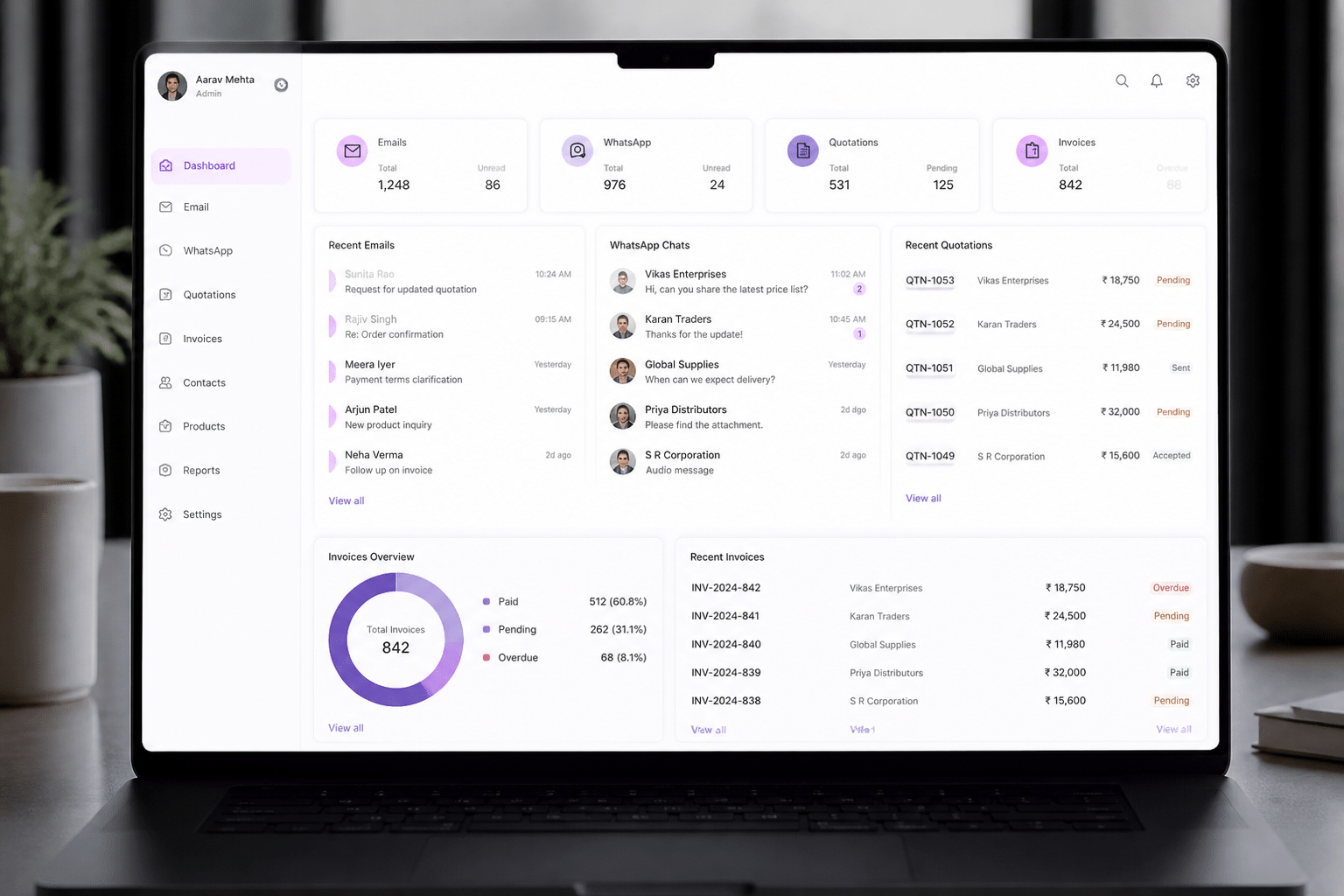
Here's something I see a lot. A business sends a nice automated email, the buyer replies, and then... the chat moves to someone's personal WhatsApp. The quote goes out from an Excel file. The invoice comes from yet another tool. Three apps, one buyer, zero shared history.
That's the gap an all-in-one platform closes. Email is just the first step. What happens after the click matters just as much.
From Email Reply to WhatsApp Chat, Without Switching Tools
Indian buyers love WhatsApp. So the smart move isn't to fight it, it's to connect it. A 2025 India SME Forum report found that 52.6% of surveyed MSMEs found it somewhat or very difficult to find suitable digital tools, and it named email and WhatsApp as major business channels. So most small teams already use both. They just don't use them together.
Here's how a connected flow looks with a platform like Leadopal:
Your automated first reply goes out when the IndiaMart enquiry lands.
The buyer replies with quantity and city.
Your rep sees the reply and continues the chat on WhatsApp, from the same lead record.
Every email and WhatsApp message gets logged in one timeline.
Nobody has to scroll through a phone to find what was said. And if a rep quits? The conversation stays. Managers can see it all, which is a big deal when you're trying to scale without losing control.
Let Email Clicks Tell Your Team Who to Call
OK, this next part is pretty cool. Your CRM doesn't just send emails, it watches what happens next.
Say a buyer opens your quotation email twice and clicks the catalogue link. That's a signal. The system can create a task for the rep: "Call Rakesh today." Someone who never opened anything? They stay in the nurture sequence and don't waste a phone call.
One caution, though. Open rates are shaky because privacy features can blur them. Clicks and replies are stronger signs. Treat opens as a hint, not proof.
This also ties into targets. When reps have a short, ranked list of warm leads, they spend time where it pays. And with sales target tracking in the same system, a manager can see who's on pace for the month and who needs a hand. No more verbal check-ins and guesswork.
Closing the Loop: Quotation, Invoice and Payment
Now picture the buyer says yes. In a patchwork setup, someone retypes the details into Word, then again into billing software. Errors creep in. Payment gets delayed.
In a connected system, the rep builds the quotation from the lead record, the buyer approves, and the same data turns into a tax invoice. A payment QR code can sit right on it. Here's the whole journey in one view:
Stage | What happens | Where it lives |
Email click | Buyer opens the catalogue, rep gets a task | Lead record |
WhatsApp chat | Rep talks price, quantity and delivery | Same lead record |
Quotation | Created from lead details, no retyping | Same lead record |
Invoice and payment | Tax invoice sent with payment QR | Same lead record |
Target update | Closed deal counts toward the rep's goal | Same lead record |
See the pattern again? One record, start to finish. That's what "all-in-one" really means.
Of course, connecting everything is only half the story. You also need to know whether it's working, so let's look at the numbers worth watching next.
Measuring What Matters: Key Email CRM Metrics for Business Growth
Open Rates Look Nice, But They Don't Pay Salaries
I'll admit it. I used to love watching open rates climb. It felt like progress. But an open rate can't tell you whether Rakesh actually bought 500 metres of fabric. Phone privacy features also blur those numbers, so they're shaky at best.
What you want are numbers tied to speed and money. Three of them do most of the heavy lifting.
3 Numbers Worth Watching
Metric | What it tells you | What to look for |
Lead response time | How fast automation reaches a new enquiry | Seconds or minutes, not hours |
Email-influenced revenue | How many won deals had an email touch | Which sequences show up in closed deals |
Sales cycle length | Days from new lead to closed deal | A shorter gap than before automation |
Lead response time is the easiest win. If your first reply goes out the moment an IndiaMart enquiry lands, this number should drop fast. If it doesn't, check your lead connection first.
Email-influenced revenue counts deals where the buyer got at least one of your emails before saying yes. Be honest about what it means, though. Email probably didn't close that deal alone. A rep's phone call likely did a lot. But it shows which emails keep turning up in your wins.
Sales cycle length needs a baseline. Write down your average days to close for the last 3 months, then compare after automation has run for a while. Shorter? Good. Same? Time to tweak your follow-up timing.
Want one more? Track lead-to-opportunity rate. One India-focused 2026 benchmark table puts an average SQL-to-opportunity rate at 25 to 40%. Treat it as a rough guide, not a rule. Your own baseline matters more.
What a Good Dashboard Shows You
Here's where an email CRM beats a standalone tool. It puts email activity next to your pipeline, so you don't stitch reports together by hand.
A useful dashboard reads like a funnel with rupees attached:
Campaign name, emails sent, clicks and replies
Leads created and deals opened from that campaign
Pipeline value at each stage
Closed revenue and average days to close
One CRM dashboard example shows exactly this idea, with won opportunities, marketing-influenced revenue and opportunities by lead source on one screen. Leadopal follows the same thinking, with a central dashboard plus a dedicated email analytics view.
So your Monday check-in gets simple. Which email led to money? Which one just got opened? Once you know, the next step is putting it all to work.
From Manual Chaos to Automated Growth: Your Next Step
Go back to that Surat trader for a second. Same 35 to 40 enquiries a month. Same busy rep. The only thing that changed is the system behind him. Now every lead gets a reply in seconds, every quote gets a nudge, and nothing hides in someone's personal WhatsApp.
That's what an email CRM really does. It saves hours your team spends on copy and paste. It stops leads from leaking out the back door. It makes your business look sharper, because every email, quote and invoice comes from one place. And it gives you a base you can grow on, without losing track of who said what.
Here's my honest take for Indian MSMEs. You probably don't need a huge global suite with a price tag to match. You need something that plugs into IndiaMart, TradeIndia and JustDial, talks on WhatsApp, and sends a GST-ready invoice with a payment QR. That's the whole job. A platform built for how you already sell beats a fancy tool you'll use 10% of.
The cost of waiting is real, too. One 2025 CRM analysis estimated that sales teams spend 41% of their time on non-revenue tasks that automation could handle. It's an estimate, not a law. Still, it probably sounds familiar.
Your 15-Minute Audit
Before you buy anything, grab a pen and answer these:
How long does a new enquiry wait before someone replies?
How many places do your leads live right now?
Can you see every WhatsApp and email chat if a rep leaves tomorrow?
How many tools do you retype the same buyer into?
Your biggest headache is your starting point. Fix that first.
Ready to See It in Action?
If those answers made you wince a little, take a look at Leadopal. It brings your lead sources, email, WhatsApp, quotations, invoicing and sales targets into one place, built for Indian MSMEs. Start small. Connect one lead source, set up one automation, and watch what happens to your response time.