

Introduction: Why Spreadsheets and Disconnected Tools Are Costing You Sales

It's 10:40 on a Monday morning. A new IndiaMart enquiry pings your phone. A JustDial lead shows up in another tab. Someone filled your website form an hour ago, and a customer is still waiting on the quote you promised on Friday. So you copy a phone number into a spreadsheet, then switch to your inbox to send a price list.
Sound familiar?
You're not alone. One 2026 report found that 62% of Indian SMB sales teams still track leads in spreadsheets or by hand. And that's exactly where deals quietly slip away.
More than 99% of B2B companies failed to reply to a new lead within five minutes. The average personalized email took 11 hours and 54 minutes.
That comes from a 2025 secret-shopper study of 114 companies, reported by LeadChaser. It's a global benchmark, not an Indian MSME number. But I'd bet your own inbox tells a similar story.
The real culprit is data silos. Your leads live in marketplaces. Your chats live on phones. Your emails sit in one tool, and your sales status sits in a spreadsheet nobody updates on time. Nobody sees the whole picture, so follow-ups get forgotten and response times stretch.
Here's the fix. An integrated email marketing CRM puts it all in one place. A lead comes in, gets recorded, receives an email, and has its status tracked without any copy-pasting. In the next sections, we'll break down the real business benefits, one by one.
What is an Integrated Email Marketing CRM? (And Why It Matters for Your Business)
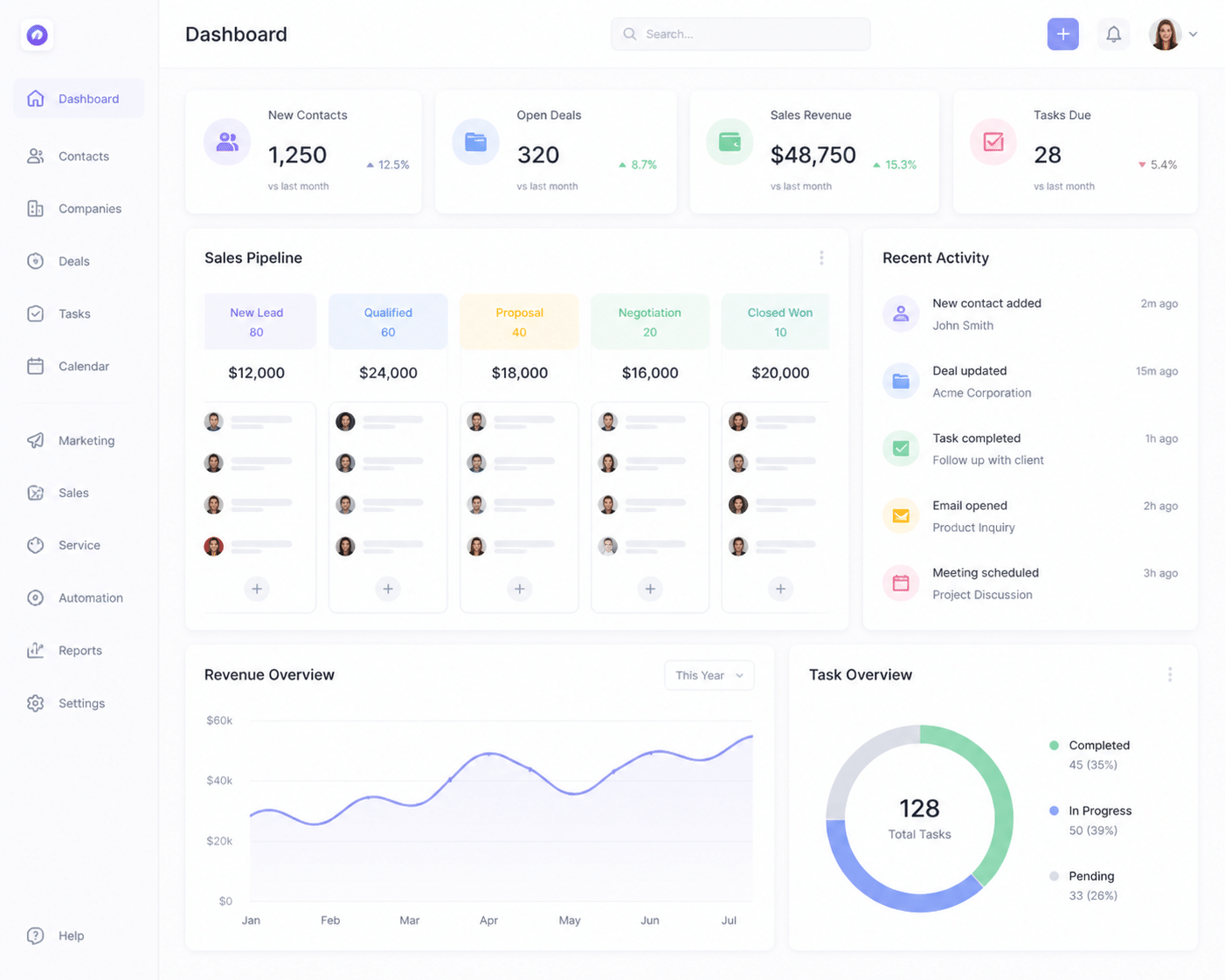
Let's keep this simple. No jargon.
A CRM is your digital sales notebook
A CRM (customer relationship management system) is one place to track every lead, customer, and deal. Think of it as the Excel file you've been building for years, except it actually updates itself. Names, phone numbers, quotes, follow-up dates, and deal status all sit on one record. When your salesperson leaves, the history stays.
Email marketing is more than newsletters
Most people hear "email marketing" and picture a monthly newsletter. But for a manufacturer or trader, it's mostly everyday stuff:
Sending a quotation after an enquiry
Announcing a new product to past buyers
Nudging a prospect who went quiet after seeing your price list
Automated follow-ups that go out when nobody has time
That's real sales work, just done by email.
So what does "integrated" actually mean?
Here's the easiest way I can explain it. Picture a shared brain for your sales and marketing teams. The CRM remembers each customer. The email tool uses that memory to send the right message at the right time.
Because both share the same data, your email tool knows where a deal stands in the pipeline. And your CRM logs every email sent, opened, or clicked. This also means emails can go out on their own when a deal changes stage, as Nutshell explains.
Here's the before and after:
Feature | Before (disconnected) | After (integrated) |
Lead sources | IndiaMart, JustDial, and forms checked one by one | All leads land in one pipeline |
Customer data | Excel sheets, copied by hand | One live record per customer |
Emails | Sent from a separate tool or inbox | Sent and logged inside the CRM |
Follow-ups | Remembered (or forgotten) | Triggered automatically |
India is clearly moving this way. MarketsandMarkets expects India's marketing automation market to grow from $924.1 million in 2025 to $2.0577 billion by 2030. Platforms like Leadopal are built around this idea for Indian MSMEs. Next, let's look at what a single customer view really changes.
Benefit #1: Get a Single, 360-Degree View of Every Customer Journey
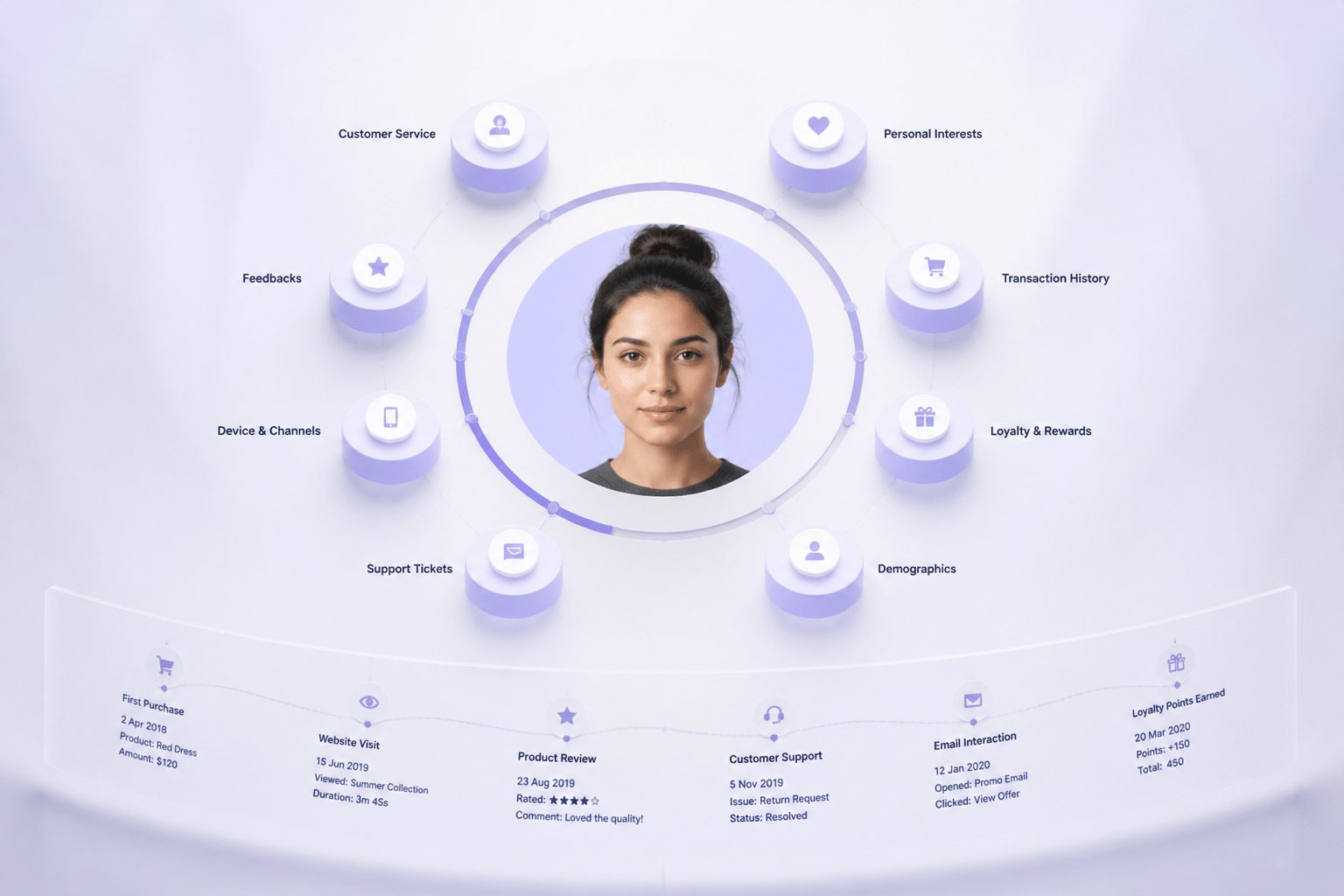
Picture this. A buyer calls and says, "I sent you an enquiry last week. Where's my quote?" Your rep scrambles. He checks WhatsApp, then the IndiaMart app, then a spreadsheet, then his email. Four tabs later, he's still guessing.
That's the data hunt. And it's a time sink nobody talks about.
Stop the data hunt
An integrated system ends it. Every lead gets one clean timeline. Say a TradeIndia enquiry comes in on Tuesday. The CRM records the lead source right away. Then it adds the email you sent, the quotation you shared, and the stage the deal sits in today. It's all there, in order, on one screen.
No copy-pasting. No "let me check and call you back."
Here's what one customer profile can look like:
What you see | Example |
Lead source | TradeIndia enquiry, Tuesday 11:15 am |
Email activity | Price list sent, opened 3 times, 1 link click |
Quotation history | Quote v1 sent Wednesday, revised quote v2 on Friday |
Deal stage | Negotiation |
Next step | Follow-up call, Monday |
The best part? Even if your salesperson quits, that history stays with the lead. Nothing walks out the door.
Give your sales team real context
Now let's talk about the call itself. Without context, a follow-up call sounds like this: "Hello sir, just checking if you saw our quote." Everyone hates that call. Buyers included.
With a complete profile, your rep sees that the lead opened the pricing email three times and clicked the bulk discount section. So the call changes. "I noticed you were looking at our bulk rates. Want me to send a quote for 500 units?" That's a much smarter conversation.
A 2025 manufacturing case from Flawless Inbound shows why this matters. A distribution company linked its CRM with order data. Reps could see order history and account status in one place, stopped switching between systems, and answered customer questions faster. It's a vendor-reported example, but the idea is simple and it applies to any trader or manufacturer.
So what should a rep know before dialing? Mostly four things:
Who the person is, and their role in the company
What emails or pages they recently engaged with
What they need, and by when
What you've already quoted or sold them
Connect marketing efforts to sales outcomes
Here's where it gets really interesting. Most small businesses can't answer a basic question: which email actually brought in money?
With everything in one system, you can follow a lead from the first email click to a closed deal. And then to the invoice that follows. Same record, same place. You'll know whether that festive-season price list email created real orders or just a few curious opens.
I'll be honest, this used to need a pile of spreadsheets and a lot of guessing. Now it's one timeline. Leadopal, for example, keeps lead source, email conversations, quotations and invoices connected on a single customer record.
A full customer view is great on its own. But it also sets up the next big win: letting the system do the follow-ups for you.
Benefit #2: Automate Personalization and Follow-Ups to Close Deals Faster
Here's a confession. Most lost deals aren't lost because the price was wrong. They're lost because nobody followed up on Thursday.
We've all been there. You promise yourself you'll message that buyer "tomorrow," and tomorrow turns into next week. An email marketing CRM fixes that by doing the remembering for you.
Set up follow-ups that run themselves
Let's say a new enquiry lands from IndiaMart. Instead of someone noticing it at lunch, the system sends a welcome email within minutes. If the buyer doesn't reply, a reminder goes out two days later. Still quiet? A task pops up for your sales rep to call.
Here's what that flow looks like, step by step:
Step | What happens | Who does the work |
1. New lead from IndiaMart | Lead is saved in the pipeline with its source | The system |
2. Auto-send welcome email | Buyer gets a personal note and your price list | The system |
3. Wait 48 hours | The system watches for a reply or a click | The system |
4. If no reply, create task | Rep gets a call reminder with the full history | Your sales rep |
Your rep only steps in when a human touch actually matters. That's the whole idea. A simple sequence like this follows common B2B advice, which suggests a follow-up around 2 to 3 days after the first email, then a value-focused message a few days later.
One tip: set the workflow to stop once the lead replies or the deal moves to a new stage. Nobody likes getting a "just checking in" email right after they've placed an order.
Stop blasting everyone the same email
Picture this. You run a pump manufacturing unit in Rajkot. You've got a special offer on industrial pumps. Do you send it to all 4,000 contacts? Please don't.
Send it only to leads who enquired about similar equipment. Because your CRM already knows what each person asked for, you can build that group in a few clicks. Group them by product interest, city, deal stage, or last contact date.
The result? Fewer unsubscribes, more replies, and a list that stays healthy. Leadopal, for example, lets you segment audiences straight from your lead records, so there's no exporting and re-importing.
Let your CRM data do the personalizing
This part's pretty cool. Dynamic fields pull details from the lead record into your email template. So one template can say:
Hi [First Name], thanks for asking about [Product] for [Company]. Here's our latest rate sheet.
Every buyer sees their own name, their own company, and the exact product they wanted. You wrote it once. Does it help? Industry data says yes. One roundup reports that personalized emails see about 29% higher unique open rates and 41% higher unique click rates than generic ones. Those are broad industry benchmarks, not guarantees for your business, but the direction is clear.
A quick warning though. Dynamic fields only work if your data is clean. A "Hi [Blank]" email is worse than no personalization at all.
So the system now follows up and personalizes for you. Next, let's see how much time that gives back to your sales team.
Want to stop losing leads?
See how Lead Opal helps you capture, track, and follow up on every lead — automatically, across WhatsApp, Email & SMS.
Benefit #3: Boost Sales Team Productivity and Eliminate Manual Work
Ask your best rep how much of the day goes to actual selling. The answer might sting. One benchmark roundup says reps spend about 14 hours a week on non-selling admin, like data entry, CRM updates and quote prep. That's almost two full working days. Gone.
An email marketing CRM gives a good chunk of that time back.
Say goodbye to double data entry
Here's a familiar routine. A lead fills out your Facebook Ad form. Someone downloads the list, pastes it into Excel, then uploads it again into the email tool. Three steps, and a typo can sneak in at each one.
With an integrated system, that lead lands in the CRM on its own, tagged with its source and ready for a welcome email. No copy-pasting. Leadopal, for example, pulls leads from Facebook Ads, Google Ads, IndiaMart, TradeIndia and JustDial into one pipeline.
Does it really save time? One vendor-reported case says yes. A company called TechScale automated lead capture and cut lead-processing time in half, with a 30% higher qualified follow-up rate. It's a vendor story, not an audited study, but the pattern makes sense.
Send quotes in minutes, not hours
Now think about quoting. Old way: open last month's Word file, change the name, retype the prices, save a PDF, attach it to an email. Miss one GST figure and you start over.
New way: a template pulls the buyer's name, company and product straight from the CRM record. You adjust the rate, hit send, and the email is logged automatically. Leadopal also lets you create quotations with variations, so a buyer comparing 500 units against 1,000 gets both options in one go.
Errors cost real money too. One source estimates a paper invoice error costs about $53.50 to fix, and says inconsistent quoting can leak 5 to 10% of margin. Those numbers are US-focused, so treat them as a rough sense of scale, not an Indian benchmark.
Let your reps do what they're good at
Good reps build trust on calls. They shouldn't be hunting for yesterday's email thread. When reminders pop up automatically and every email is logged to the lead, they can spend that time talking to buyers.
Here's the shift in plain terms:
Task | Before | After |
Lead entry | Manual data entry | Automated data sync |
Emails and quotes | Generic emails, rewritten each time | Personalized templates |
Follow-ups | Forgotten follow-ups | Automated reminders |
It's not flashy. But a rep who gets two hours back each day can make a few more calls, and a few more calls usually mean a few more orders.
Of course, once the work runs itself, you'll want to know what's actually working. That's where reporting comes in.
Benefit #4: Make Data-Driven Decisions with Unified Reporting
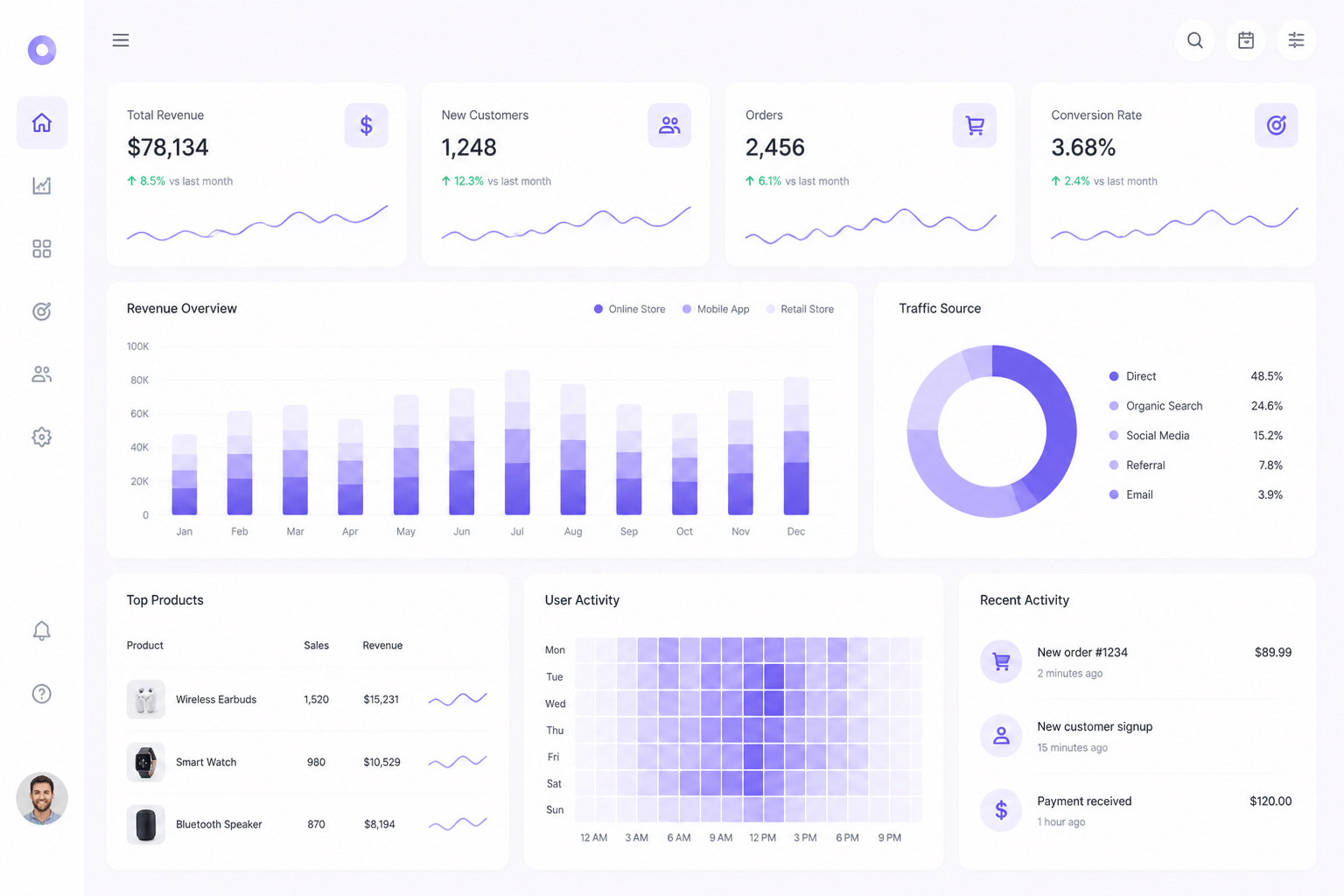
Here's a question that stumps most owners I talk to. Which email last quarter actually brought in money?
Not opens. Not clicks. Money.
A report from Book Your Data says 65% of B2B sales teams were expected to move from gut feel to data-driven decisions by 2026. It's a forecast, not proof that data wins every time. But it shows where things are heading.
Look past opens and clicks
Open rates are a bit shaky these days, since privacy features can inflate them. Clicks are better. Replies, quotes and closed orders are best. When your email tool and CRM share one record, you can follow a campaign from the first click to the final invoice.
Here's a sample of what a simple dashboard could show (the numbers are made up, just to show the idea):
Email campaign | Sent | Clicks | Qualified leads | Revenue |
Festive price list | 1,200 | 96 | 18 | ₹4,20,000 |
New pump range | 800 | 40 | 9 | ₹1,60,000 |
Monthly newsletter | 2,500 | 55 | 2 | ₹25,000 |
See it? The newsletter went to the most people and earned the least. So you'd probably send more of the price list and less of the newsletter.
This kind of view also helps with spending. One vendor-reported case from DaVinci Solutions says a unified dashboard found $12,000 a month in wasted ad spend within two weeks. It's a vendor story, but the lesson holds: move money toward what produces qualified leads.
Spot your hottest prospects
Not every lead deserves a call today. Some opened your quote four times this week. Others haven't touched an email since March.
A unified dashboard can rank leads by recent activity. Think email clicks, replies and quote views. Your rep starts the morning with a short list of warm buyers instead of a long list of names. Wasted calls drop. Conversations get better.
Coach your sales team with real numbers
Owners often judge reps by gut feel or by who talks the loudest. That's unfair to quiet performers (and it's how good people leave).
With reporting in one place, you can compare each rep on:
Emails and follow-ups sent
Reply rates
Lead-to-customer conversion rate
Progress against monthly targets
Leadopal, for example, has a unified analytics dashboard plus sales target tracking with weekly, monthly, quarterly and yearly views. So you can see who's ahead, who's stuck, and who needs a bit of coaching.
One caution. Numbers show what is happening, not always why. Use them to start a conversation, not to end one.
Now you know what the system can do for you. Next, let's look at how to pick the right one.
How to Choose the Right Integrated Platform for Your Indian MSME
Picking a platform feels like a big bet. Every demo sounds the same, and every vendor says "all-in-one." So here's the short filter I'd use.
Start with your lead sources
If your enquiries come from IndiaMart, TradeIndia and JustDial, the platform has to pull them in directly. Not "download a CSV and upload it." Directly. Indian CRM guidance recommends capturing leads straight from IndiaMART, Justdial, Facebook Lead Ads and Google Ads, then assigning them to reps automatically. Otherwise leads end up stuck in portals or on personal phones.
Here's a simple test. Ask the vendor to capture one real lead during the demo. Watch what happens.
Look for true all-in-one
In India, WhatsApp isn't a bonus. Recent reviews treat WhatsApp Business integration as a market requirement, along with rupee billing and mobile access. So an email tool that ignores WhatsApp, SMS and invoicing leaves you juggling again.
Stitching separate tools together has a hidden bill too. One 2026 analysis puts automation middleware at $50 to $150 a month, plus 2 to 5 hours of upkeep per integration. Leadopal, for example, keeps email, the official WhatsApp API, SMS, quotations and invoices under one login.
But all-in-one isn't automatically cheaper. Check user limits, email sending limits and WhatsApp message charges before you sign.
Ask who it's built for
The system should suit an owner or sales manager, not an IT person. A drag-and-drop automation builder is the feature to look for. During the trial, try building your own follow-up flow (welcome email, two-day wait, call task). If you can't finish it in one sitting, that's your answer.
Here's a quick checklist to carry into your demos:
Key Features for an Indian MSME's Email Marketing CRM
* Direct IndiaMart, TradeIndia and JustDial integration
* Facebook Ads, Google Ads and website form capture
* Official WhatsApp API with a shared inbox
* Email campaigns with audience segmentation
* Bulk SMS with DND-compliant segments
* Drag-and-drop automation builder
* Quotations and tax invoices in the same system
* Sales target tracking for each rep
* Role-based access for your team
* One analytics dashboard
* India-based pricing and support
Tick most of these boxes and you're probably looking at the right kind of platform. Let's wrap this up next.
Conclusion: Stop Juggling Tools, Start Growing Your Business
Let's go back to that Monday morning. The IndiaMart ping, the JustDial lead, the quote you still owe. It doesn't have to feel like that.
Here's what we covered. A single customer view means nobody hunts through four tabs for one buyer's history. Automation sends follow-ups on Thursday, even when everyone's busy. Your reps get hours back for real conversations. And one dashboard shows which email brought in orders, not just opens.
Simple. Not flashy. But it adds up.
The bigger point? An integrated email marketing CRM is probably the most useful step an Indian MSME can take to professionalize how it sells. It's how you compete with bigger players without hiring ten more people.
There's a good sign on the growth side too. A survey of 7,835 Indian MSMEs found that 41.4% of digitally active businesses reported a 21 to 30% rise in sales linked to digital adoption. That covers digital tools broadly, not email CRM alone, but the direction is hard to ignore.
Your 15-minute next step
Don't start with a demo. Start with a notepad. List how you collect leads, send follow-ups, run email campaigns and track sales. Then write down the biggest problem next to each one.
Current task | How you do it today | Biggest problem |
Collecting leads | Portals, WhatsApp, forms | Missing or duplicate contacts |
Follow-ups | Memory or reminders | Leads get forgotten |
Email campaigns | Separate tool | No customer history |
Tracking sales | Spreadsheet | Unclear conversion rates |
Next, count your last 30 days: new leads, follow-ups sent, and customers won. If the gaps jump out at you, that's your answer.
When you're ready, shortlist two or three platforms and run the live demo test from earlier. Capture one real lead and watch it flow. Explore Leadopal, an all-in-one sales and marketing platform built for Indian MSMEs and see if it fits how your team actually sells.