

Why Your Sales Team is Drowning in Chats (And How a WhatsApp CRM is the Lifeline)

Picture this. It's 9pm, and a buyer from IndiaMart just messaged one of your reps. The rep is at dinner. The message sits unread while a competitor replies in four minutes.
Sound familiar? Sales on WhatsApp is how Indian MSMEs really work. Meta reports that 91% of Indian online adults chat with a business every week. Your customers are there, and so is your team. The trouble is how they're there.
Most reps use personal numbers. Chats get scattered across five or six phones. Nobody knows who replied, who didn't, or what price got quoted last Tuesday.
That mess creates three big headaches:
Missed leads. IndiaMart inquiries, ad leads and website forms land in different places, and some never get answered.
No manager visibility. You can't coach what you can't see.
Lost data. When a rep quits, the chat history walks out the door with them.
The numbers are rough, but they sting:
What goes wrong | What the research says |
|---|---|
Slow first reply | Leads contacted within 5 minutes are reported to be 21 times more likely to qualify than those reached after 30 minutes |
A salesperson leaves | One vendor estimates ₹2 lakh to ₹10 lakh in lost pipeline per exit (directional, not an audited figure) |
So what's the fix? Not banning WhatsApp. Your buyers love it, and honestly, that ship has sailed.
A proper whatsapp crm turns the chaos into a system. Every chat lives in one shared place that the business owns. Leads get assigned, replies get tracked, and history stays put when people move on. Tools like Lead Opal are built for exactly this. It's the difference between WhatsApp being a liability and becoming a real sales asset.
Let's start with what a WhatsApp CRM actually is.
1. What is a WhatsApp CRM? (Hint: It's More Than Just the Business App)
The simple version
A WhatsApp CRM is software that puts your team's WhatsApp chats, leads and follow-ups in one shared place. It connects to the official WhatsApp Business API, so the conversations belong to your company and not to one rep's phone.
That's the whole idea. But the details matter, because plenty of people think the free Business App already does this. It doesn't. Not really.
Why the free app and spreadsheets fall short
The free WhatsApp Business App is great for a tiny shop. Meta says it supports up to 10 linked devices, but it's still built for manual replies. You get greeting messages and quick replies. No lead routing, no real reports, no way to see who dropped the ball.
Spreadsheets are the other usual fix. They're familiar, sure. But someone has to type every lead in by hand, and the data is stale the moment it's saved. A chat reply never shows up in the sheet on its own.
Here's how the three options stack up:
Option | Multi-user Access | Automation | Lead Integration | Reporting | Scalability |
|---|---|---|---|---|---|
Free WhatsApp Business App | A few linked devices, little control | Greeting, away and quick replies only | Manual copy-paste | Basic chat counts | Hits a ceiling fast |
Spreadsheets | One editor at a time, no chats inside | None, reminders live in memory | Typed in by hand | Manual formulas, often outdated | Gets messy as rows pile up |
WhatsApp CRM | Shared inbox with role-based access | Lead routing, follow-ups, template messages | IndiaMart, ads and forms flow in | Real-time dashboards | Add reps and leads without chaos |
The API: the highway under the hood
Think of the Business App as a single-lane road. One person drives each conversation, and everything moves by hand. The WhatsApp Business Platform, better known as the API, is a multi-lane highway. Software can route messages, many agents can work at once, and approved updates go out without anyone typing them.
The API isn't a separate WhatsApp that your customers have to learn. They chat the way they always have. Behind the scenes, though, your CRM can:
Share one inbox across the whole team
Send automated messages and reminders
Connect with your lead sources and other business tools
That's the foundation of whatsapp business api crm setups. Lead Opal, for example, builds on the official API and adds a shared inbox where managers can also see reps' personal and API-based numbers.
So what do you actually get from all this? Let's start with the first benefit.
2. Benefit #1: Unify Every Lead from IndiaMart, Ads, and Your Website
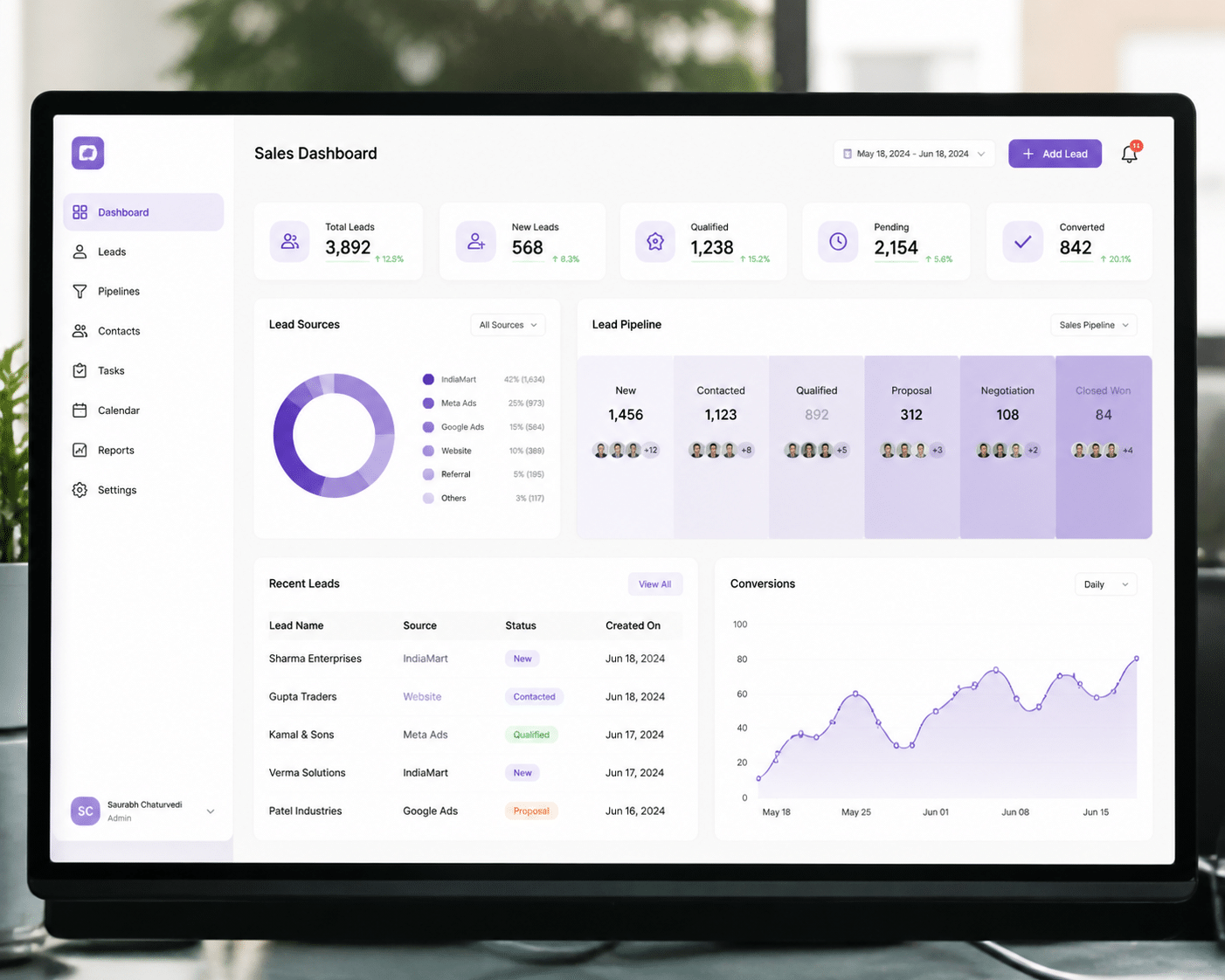
How many tabs do you open before lunch just to check for new leads? IndiaMart in one, TradeIndia in another, then Facebook, Google, and that website inbox nobody remembers to check. I've seen owners do this every single day. It's tiring, and it's exactly how good leads slip through.
One place where every inquiry lands
A good whatsapp crm fixes this by acting as a single point of truth. Every inquiry, no matter where it started, shows up in the same pipeline. Same screen. Same format. Same owner.
Here's what that looks like in practice:
Where the lead starts | What happens in the CRM |
|---|---|
IndiaMart, TradeIndia, JustDial | Inquiry drops into the pipeline within moments |
Facebook Ads and Google Ads | Form fills are pulled in automatically |
Website or custom form | Submission creates a new lead with the buyer's details |
Custom webhook | Any other tool can push leads into the same list |
Lead Opal connects to all of these, so nobody has to copy and paste from a marketplace dashboard into a spreadsheet at 8pm.
From new lead to first WhatsApp message
This is the part I like most. The lead doesn't just sit there.
A buyer sends an inquiry on IndiaMart (or fills your website form).
The lead appears in your pipeline and gets assigned to a rep, often by automatic routing.
The rep sees the name, number, product interest and source in one view.
They tap to start a WhatsApp chat right from that same screen.
No switching apps. No hunting for the number. The first message goes out while the buyer is still looking at their phone.
Zero lead leakage and the 5-minute rule
Lead leakage is just a fancy way of saying "we paid for that lead and then forgot about it." When everything lands in one pipeline, a lead without an owner or a reply is easy to spot.
Speed matters even more. One IndiaMart-focused guide says 35 to 40% of buyer inquiries may go cold within the first hour. The same source describes a textile client that cut its first response time from 4 hours 20 minutes to under 15 minutes. Its close rate went from 8% to just over 14%. That's a vendor-reported result, so treat it as a hint, not a promise. But the direction is hard to ignore.
I can't tell you the exact number of sellers chasing each IndiaMart lead, because the marketplaces don't publish it. What I do know is this: when buyers ask several suppliers at once, the first useful reply usually gets the conversation. A sub-5-minute response gives you a real shot at being that reply.
So once every lead is in one place, the next question is: who can actually see what your team is saying to them?
3. Benefit #2: Gain Full Visibility & Control Over Sales Conversations
Ever asked a rep, "What did you tell that buyer about the price?" and got a shrug? Or the classic, "Let me scroll through my phone"? I've watched a sales head squint at a junior's screen for ten minutes just to find one quote. Painful.
What a shared team inbox actually does
A shared team inbox is one screen where every sales chat lives. Managers see conversations as they happen. Nobody hands over a phone, and nobody forwards screenshots at midnight.
The old way is messy. Kalk Solutions describes buyer inquiries split across three to five staff phones, so the sales head can't tell what a junior engineer quoted. A shared inbox fixes that.
Lead Opal's WhatsApp module includes a dedicated shared inbox that manages your reps' numbers, both personal and API-based. Role-based permissions let you decide who sees which modules. Here's roughly how a manager's view looks:
Buyer | Assigned rep | Stage | Manager note |
|---|---|---|---|
Sharma Traders | Rahul | Quote sent | Price approved, follow up Friday |
Gupta Steel | Priya | New inquiry | No reply yet, needs attention |
Patel Textiles | Amit | Negotiation | High value, offer a call |
Mehta Pipes | Unassigned | New inquiry | Reassign now |
One glance. You know who owns what, and what's stuck.
When a rep quits, the chats stay
This one hurts if you've lived it. A good rep resigns, and months of buyer history sit on a phone that's walking out the door.
With a shared inbox, the conversations, contacts and sales history belong to the company. Not to a person's device. The new rep opens the thread, reads what was promised, and carries on. The buyer doesn't have to repeat anything.
It matters even more in dealer and distributor sales. LeadSquared points out that personal chats can hold quotations, pricing, catalogues and complaint details. That's business data, and it shouldn't live on someone's personal phone.
Coaching and reassigning in the moment
Now the fun part. When you can see chats live, you can coach live.
Spot a rep sending a weak reply? Give a quick tip before the deal cools.
See a high-priority buyer waiting? Reassign the chat to whoever's free.
Notice a rep running behind? Move two leads off their plate.
That's how fast service happens when you're juggling ten people and a hundred leads.
One caution, though. Visibility isn't spying. Tell your team that you're watching work conversations in a company system, not their private chats. Use it for coaching, not for catching people out. Trust me, morale stays much healthier that way.
Once you can see everything, the next question is how to stop good leads from going quiet after the first reply.
4. Benefit #3: Automate Follow-Ups and Nurture Leads on Autopilot

Here's an uncomfortable truth. Most leads don't go cold because they said no. They go cold because nobody followed up.
Reps aren't lazy. They're juggling 40 chats, a pending quote, and a customer who wants a price revision by 6pm. Something has to slip, and it's usually the polite "just checking in" message.
Want to stop losing leads?
See how Lead Opal helps you capture, track, and follow up on every lead — automatically, across WhatsApp, Email & SMS.
One message is never enough
Sales research from RAIN Group, summarised by Rework, suggests it takes around eight touchpoints to win a first meeting with a new B2B prospect. Top sellers get there in about five. Either way, that's a lot of messages to remember by hand.
This is where whatsapp automation for business helps. You don't need a developer. Lead Opal's drag-and-drop Automation Builder lets you set rules once, then the system does the remembering.
Three simple workflows you can set up this week
1. Instant welcome message with your catalogue. A new lead lands from IndiaMart or your website form. Within seconds, they get a friendly WhatsApp message with your product catalogue attached. Something like: "Hi Sharma ji, thanks for your inquiry! Here's our latest catalogue. A team member will reach out shortly." Since your business starts this chat, it goes out as a Meta-approved template.
2. A 24-hour nudge for your rep. If nobody has contacted the lead in a day, the system alerts the assigned rep. Maybe it pings the manager too. No more leads sitting quietly in a pipeline.
3. A "checking in" message after 3 days. Buyer went silent? An automatic, polite message goes out: "Hi, just checking if you had a chance to look at our quote. Happy to answer any questions." Short. Human. Done.
Here's how the full sequence flows:
Step | What triggers it | What happens |
|---|---|---|
1. New lead | Inquiry arrives from any source | Lead is created and assigned to a rep |
2. Instant welcome message | Lead creation | Template message with catalogue goes out on WhatsApp |
3. 24-hour inactivity check | No contact logged in 24 hours | System checks if anyone has replied or called |
4. Rep alert | Check finds no activity | Rep (and manager, if you like) gets a reminder |
5. 3-day follow-up message | Still no response from the buyer | Automatic "checking in" message is sent |
Plus, you can tweak the timing. Maybe your buyers need 48 hours, not 24. Change it in a minute.
What your team gets back
HubSpot's sales data says 81% of sales leaders believe AI can reduce time spent on manual tasks. Reminders, welcome messages and nudges are exactly that kind of manual work. I can't promise a specific morale boost (nobody has solid numbers on that), but I'd bet your reps won't miss copy-pasting the same greeting 30 times a day.
The real prize is where their time goes instead. Negotiating a tricky price. Calling a big distributor. Building trust with a buyer who's been burned by other suppliers. That's the work only a person can do.
One warning, though. Automation should support your reps, not replace them. Keep messages short, only message people who've shown interest, and let a human take over the moment a buyer replies.
Once follow-ups run on their own, the next question is whether you can actually measure how your team is doing.
5. Benefit #4: Drive Accountability with Data-Driven Sales Performance
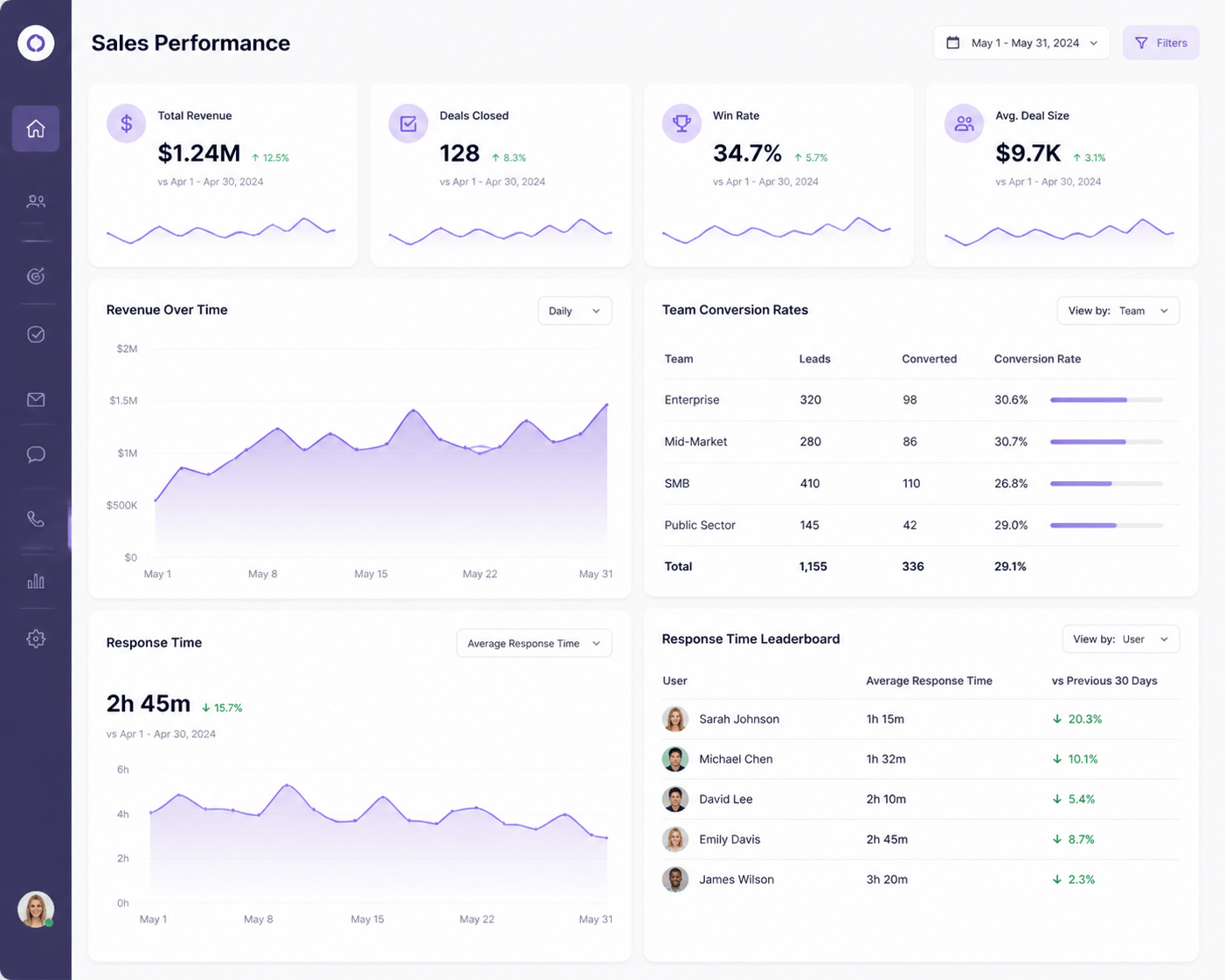
Review season arrives. The sales head says, "Rahul feels slow." Rahul says, "I'm working harder than anyone." Both are guessing. Nobody has numbers.
The numbers you couldn't see before
When every chat runs through one shared system, the system keeps score. It's not creepy. It's just timestamps and deal stages. A manager can finally track:
Average first response time for each rep
New conversations started every day
Lead-to-deal conversion rate per rep
The stage of every deal in the pipeline
Lead Opal also has Sales Target Management, so you can set a target for each rep and look back across weeks, months, quarters and years. Here's a rough mockup of what a sales dashboard might show (the numbers are made up, just to give you the picture):
Dashboard widget | What it tells you | Example reading |
|---|---|---|
Average Response Time | How fast each rep sends a first reply | Priya 3 min, Amit 2 hrs |
Leads Handled by Rep | Who is carrying how many leads | Rahul 42, Priya 55, Amit 38 |
Conversion Rate by Source | Which channel turns into real orders | IndiaMart 11%, Website 7% |
Team Target vs. Achieved | How close the team is to the month's goal | ₹18 lakh of ₹25 lakh |
Why response time gets its own widget
Speed shows up in the money. A 2025 survey of 939 B2B companies reported a 32% close rate when firms replied within five minutes, against 15% when prospects waited up to 24 hours. Different industries and funnels, so treat it as a hint. But your own dashboard can show the same pattern for your own team.
Reviews built on facts, not feelings
Now imagine that review again. Priya replies in 3 minutes and converts 14% of her leads. Amit replies in 2 hours and converts 6%. The talk changes from "you seem slow" to "what's getting in your way?" Maybe Amit needs a template. Maybe he's buried under too many leads. Either way, the coaching is targeted.
Incentives get fairer too. Reward conversions, quick replies and finished follow-ups. Don't reward raw message counts, because that just teaches reps to send more messages, not close more deals.
One honest caveat. Numbers need context. A slow reply might mean a plant visit or a power cut, not laziness. Show your team the dashboard upfront, let them explain odd results, and keep it about coaching.
Data is great. But which tool gives you all this without a headache? That's up next.
6. How to Choose the Right WhatsApp CRM for an Indian Business
Here's the thing. Pick the wrong tool and you'll be back to chaos in three months, just with a bigger bill. I've seen it happen. A trader buys a shiny CRM, then finds out it doesn't talk to IndiaMart and can't make a GST invoice. Oops.
So let's make this simple. Here's a short checklist you can take into any demo.
Your WhatsApp CRM checklist
Must-have | Why it matters for an Indian MSME |
|---|---|
Official WhatsApp API | Keeps your number safe and your chats owned by the company |
IndiaMart and TradeIndia integration | Inquiries land in your pipeline without copy-paste |
JustDial, ads and form integrations | Every lead source ends up in one place |
Built-in quotes and GST invoicing | No hopping to Tally or Word to close a deal |
Drag-and-drop automation builder | Routing and follow-ups without a developer |
Shared inbox with role-based access | Managers see chats, reps only see their modules |
Reports and sales targets | Facts for reviews, not guesses |
India-friendly pricing | Fits a small team's budget |
Not every box is equal, though. Let's look at the two that trip people up most.
Why "official API" is non-negotiable
Some tools promise unlimited bulk messaging through a QR code scan. Sounds great. It isn't. WhatsApp's Help Center says unauthorized apps break its Terms of Service and can lead to temporary or permanent bans. Lose that number and you lose the one your buyers already know.
So ask the vendor plainly: "Do you connect through the official WhatsApp Business Platform?" Walk away from any "no approval needed" pitch. Lead Opal, for example, gives you official API access plus a shared inbox for reps' personal and API-based numbers.
India-specific features generic tools skip
Big global CRMs are good. But many don't plug into IndiaMart or TradeIndia out of the box. Fewer still make a GST-ready tax invoice with a payment QR code. For a wholesaler sending 20 quotes a day, that gap eats hours.
And the automation builder? It should feel like drawing a flowchart, not writing code. If your sales head can't set a 24-hour follow-up rule alone, it's too complicated.
One platform beats a patchwork
It's tempting to stack a CRM, a WhatsApp broadcaster, an email tool and invoicing software. Each one looks cheap alone. But then you're back to typing data from one screen into another, which is the exact problem you set out to fix.
Prices vary a lot, so I won't pretend there's one clean average. Still, a small stack of separate tools can roughly land between ₹1,700 and ₹11,500 a month before WhatsApp message charges. An all-in-one plan often sits around ₹2,000 to ₹10,000. Those are rough planning ranges, not quotes. Check what each vendor includes: users, contacts, API fees and support.
My advice? Start with one platform that covers leads, WhatsApp, automation and invoicing. Lead Opal is built that way for Indian MSMEs, so it's a fair one to put on your shortlist. Ask for a demo, bring your real IndiaMart leads, and see if it feels natural.
Once you've picked, the last step is putting it all to work.
Stop Juggling Tools: Make WhatsApp Your Central Sales Engine
So, where does this leave you?
Let's do a quick recap. A WhatsApp CRM gives you five things your phones and spreadsheets never could:
Unified leads. IndiaMart, ads and website inquiries all land in one pipeline.
Full team visibility. Chats live in a shared inbox, and they stay when a rep leaves.
Automation. Welcome messages, nudges and follow-ups happen without anyone having to remember.
Real accountability. Response times and conversion rates replace guesswork in reviews.
A professional customer experience. Buyers get quick, consistent replies from an official business number, not a random personal one.
That's the big shift. WhatsApp stops being a messy side channel and becomes an organized, scalable sales machine.
And the timing is good. More than 15 million Indian businesses were on WhatsApp Business by the end of 2024, with nearly 175 million daily business interactions. Your buyers are already there. The next growth step isn't finding another channel. It's getting control of the one you have.
The good news? You don't need to rebuild your sales process or teach customers anything new. Start with the chats already happening, connect them to one shared system, and watch how much faster your team can reply, follow up and close.
Lead Opal was built for exactly this, with lead capture, an official WhatsApp API inbox, automation, targets and GST-ready invoicing under one roof. Bring a few of your real leads and see how it feels.
See How Lead Opal Unifies Your Sales & Marketing: Book a Free Demo Today